> ## Documentation Index
> Fetch the complete documentation index at: https://onlytraffic.com/docs/llms.txt
> Use this file to discover all available pages before exploring further.
# My Slots
> Add a model to the exchange, choose what it gives and which partners it accepts, and follow its balance, visits and warnings.
My Slots lists your models in the exchange. Every model has a slot: what it gives, which partners it accepts and the creatives partners publish it with.
## The My Slots page
* **How the exchange works**: five steps as your account's progress: add a model, set up the slot, give first, receive, first revenue. The block can be hidden.
* **Exchange results**: 30 days of fans your models received (columns), views received from partners and profile visits (lines). The header sums them up with the revenue of the fans received.
* **Exchange pool**: how many models are in the exchange, their fans, and what the pool exchanged in 7 and 30 days.
* **Your models in the exchange**: status, what the model gives, given and received, revenue and profile visits for 7 days. Every column sorts; a click on a row opens the slot.
### Slot statuses
| Status | What it means |
| - | - |
| **Working** | The model gives and receives on its own |
| **No creative** | Partners can only pin the model in friends: add story, post or bio creatives |
| **Paused: no access** | The model lost OnlyFans access; nothing goes out until access is back |
| **Off** | You switched the slot off |
| **Disconnected: boosting** | Targeted boosting or bots were found; the model is out of Shoutouts |
A working slot can still have warnings: "N warnings" under the status lists them, and the slot page shows each one with a fix.
## Add a model
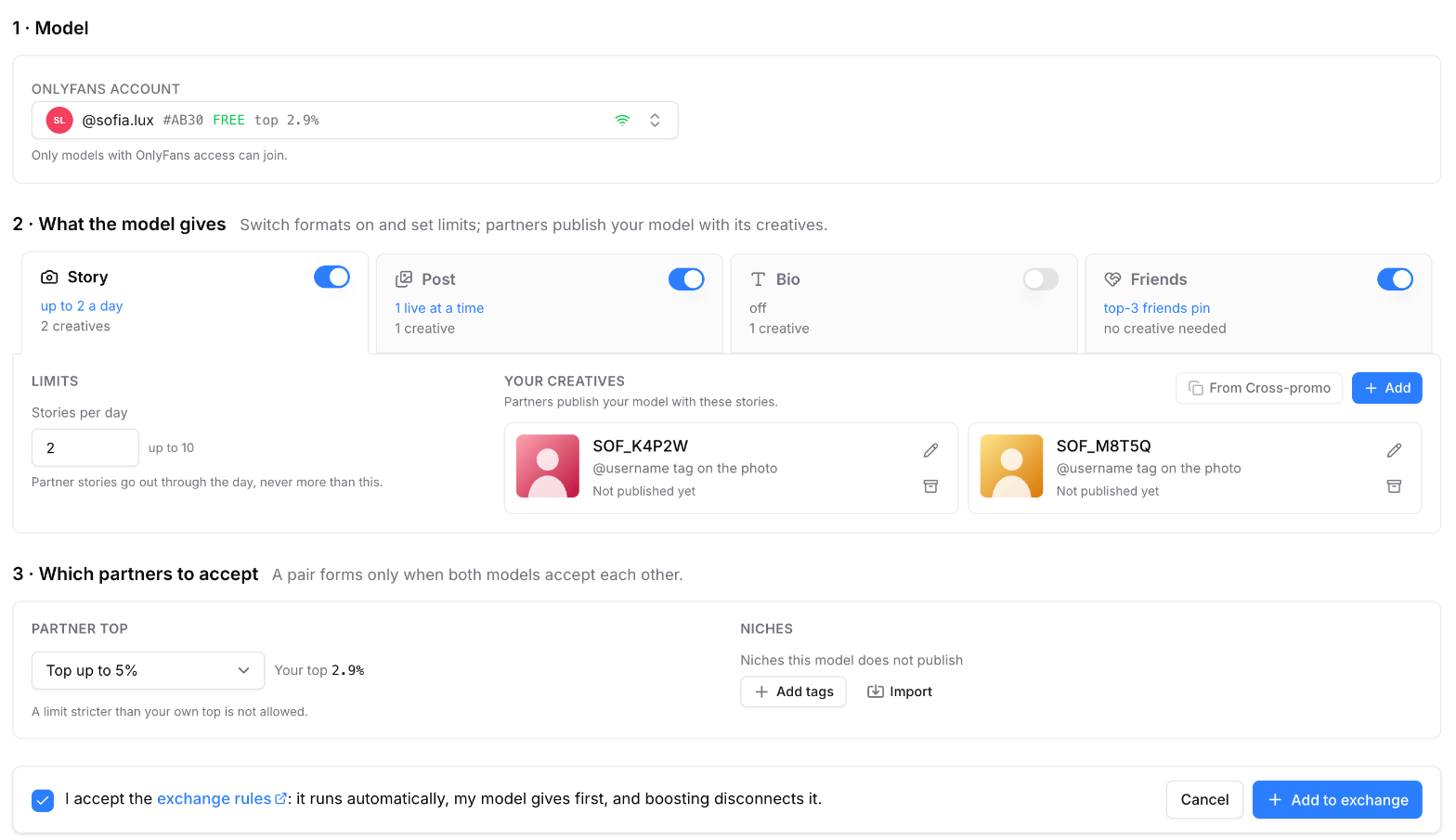 Click **Add model** in My Slots. Only models with OnlyFans access can join.
Switch formats on and set the limits:
* **Story**: up to 10 a day. They go out spread through the day, at least an hour after any other story of the model.
* **Post**: up to 10 live at a time. **Pin posts** keeps partner posts at the top of the feed.
* **Bio**: a partner's line at the top of the bio.
* **Friends**: partners pinned at the top of the friends list.
Next to each format are your model's own creatives: partners publish your model with them. Friends need no creative.
**Partner top**: the lowest top you accept, for example "Top up to 6.5%". It cannot be stricter than your own top. **Niches**: tags of models your model does not publish. **Import** takes a comma-separated list of tags, and **Copy** puts the current list on the clipboard for another slot.
Tick the exchange rules and click **Add to exchange**. The model starts by giving first.
## The slot page
The header has the model and the **In exchange** switch. The page has four tabs: Dashboard, Settings, Creatives and Log.
Click **Add model** in My Slots. Only models with OnlyFans access can join.
Switch formats on and set the limits:
* **Story**: up to 10 a day. They go out spread through the day, at least an hour after any other story of the model.
* **Post**: up to 10 live at a time. **Pin posts** keeps partner posts at the top of the feed.
* **Bio**: a partner's line at the top of the bio.
* **Friends**: partners pinned at the top of the friends list.
Next to each format are your model's own creatives: partners publish your model with them. Friends need no creative.
**Partner top**: the lowest top you accept, for example "Top up to 6.5%". It cannot be stricter than your own top. **Niches**: tags of models your model does not publish. **Import** takes a comma-separated list of tags, and **Copy** puts the current list on the clipboard for another slot.
Tick the exchange rules and click **Add to exchange**. The model starts by giving first.
## The slot page
The header has the model and the **In exchange** switch. The page has four tabs: Dashboard, Settings, Creatives and Log.
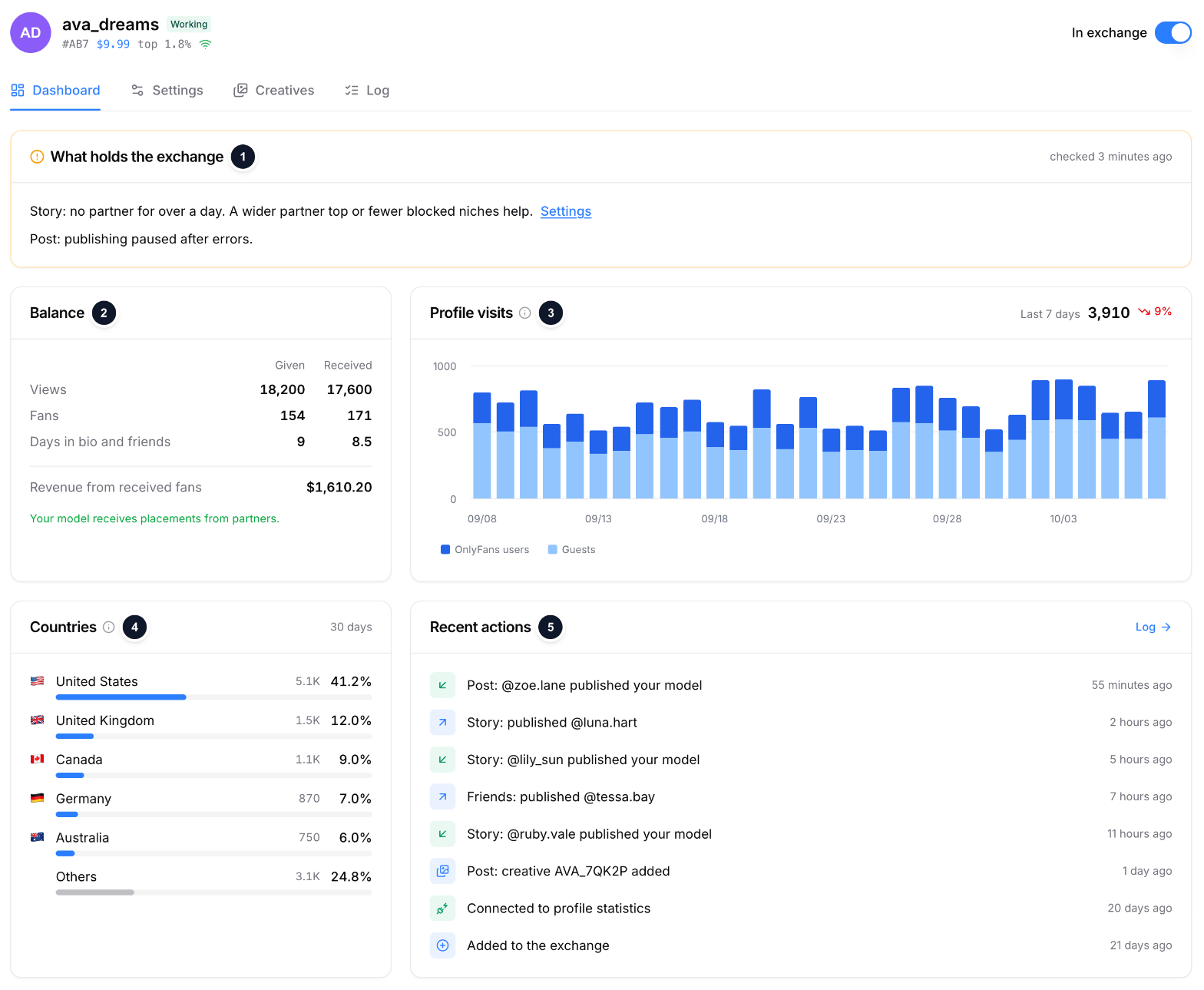 1. **What holds the exchange**: the engine's last check, with a fix next to each warning.
2. **Balance**: given and received views, fans and days, and the revenue of the fans received. While the model gives first, a progress bar shows how much is left.
3. **Profile visits**: unique visitors per day from OnlyFans, guests and OnlyFans users, the last 7 days against the previous 7.
4. **Countries**: where profile views came from in the last 30 days.
5. **Recent actions**: added, connected, creatives, exchanges. **Log** opens the full list.
The other tabs:
* **Settings**: the same form as when adding. When the partner top moved with your model's top, the form shows the value in force next to the one you set.
* **Creatives**: the model's exchange creatives with what partners delivered. More: [Creatives](/docs/shoutouts-creatives).
* **Log**: every exchange of the model, the same list as on [Placements](/docs/shoutouts-placements) with its own period.
## Warnings
| Warning | Why | What to do |
| - | - | - |
| **No OnlyFans access** | The model's session ended | Restore access on the account page |
| **Not connected to statistics yet** | The model is being connected | Nothing: it retries every 15 minutes |
| **No creative** | Partners cannot publish the model in a format | Add a creative or copy one from Cross-promo |
| **No partner for over a day** | Nobody fits the top and niches in a format | Widen the partner top or exclude fewer niches |
| **Received more than given** | Debt over the limit | Nothing: partners publish the model again once it gives back |
| **Gave far more than received** | Surplus over the limit | Nothing: the model gives again once partners give back |
| **Paused after errors** | OnlyFans refused several publications in a row | Nothing: the engine tries again later |
| **Bio skipped** | The top of your bio already carries a link | Nothing: skipped by design |
| **Friends skipped** | The model has its own pinned friends | Nothing: skipped by design |
## Switching off
The **In exchange** switch on the slot page stops the model from giving and receiving at any time. The posts, bio line and friends pins it carries for partners come down; stories stay until their 24 hours end. When a model loses OnlyFans access, its slot pauses by itself and resumes once access is back.
## Where to find it
Studio → Shoutouts → [My Slots](https://studio.onlytraffic.com/shoutouts/slots).
This documentation is built and hosted on [Mintlify](https://mintlify.com), a developer documentation platform.
1. **What holds the exchange**: the engine's last check, with a fix next to each warning.
2. **Balance**: given and received views, fans and days, and the revenue of the fans received. While the model gives first, a progress bar shows how much is left.
3. **Profile visits**: unique visitors per day from OnlyFans, guests and OnlyFans users, the last 7 days against the previous 7.
4. **Countries**: where profile views came from in the last 30 days.
5. **Recent actions**: added, connected, creatives, exchanges. **Log** opens the full list.
The other tabs:
* **Settings**: the same form as when adding. When the partner top moved with your model's top, the form shows the value in force next to the one you set.
* **Creatives**: the model's exchange creatives with what partners delivered. More: [Creatives](/docs/shoutouts-creatives).
* **Log**: every exchange of the model, the same list as on [Placements](/docs/shoutouts-placements) with its own period.
## Warnings
| Warning | Why | What to do |
| - | - | - |
| **No OnlyFans access** | The model's session ended | Restore access on the account page |
| **Not connected to statistics yet** | The model is being connected | Nothing: it retries every 15 minutes |
| **No creative** | Partners cannot publish the model in a format | Add a creative or copy one from Cross-promo |
| **No partner for over a day** | Nobody fits the top and niches in a format | Widen the partner top or exclude fewer niches |
| **Received more than given** | Debt over the limit | Nothing: partners publish the model again once it gives back |
| **Gave far more than received** | Surplus over the limit | Nothing: the model gives again once partners give back |
| **Paused after errors** | OnlyFans refused several publications in a row | Nothing: the engine tries again later |
| **Bio skipped** | The top of your bio already carries a link | Nothing: skipped by design |
| **Friends skipped** | The model has its own pinned friends | Nothing: skipped by design |
## Switching off
The **In exchange** switch on the slot page stops the model from giving and receiving at any time. The posts, bio line and friends pins it carries for partners come down; stories stay until their 24 hours end. When a model loses OnlyFans access, its slot pauses by itself and resumes once access is back.
## Where to find it
Studio → Shoutouts → [My Slots](https://studio.onlytraffic.com/shoutouts/slots).
This documentation is built and hosted on [Mintlify](https://mintlify.com), a developer documentation platform.