Case Study: +30% Revenue in a Month from Free Internal Cross-Promo (3,670 Fans, Zero Ad Spend)
Last month we switched on one traffic channel that cost us nothing, and it sent 3,670 fans to our own OnlyFans pages. No ad budget, no extra hire. These were fans we already had, moved from one page to another inside our roster. Across the pages we tracked, that came out to about a 30% lift in revenue for the month.
If you run a single page, this one won't help you much. The whole approach rests on having several pages and an audience you can circulate between them. So it's built for agencies and creators managing a roster.
What internal cross-promo is, and why we always ran it
Internal cross-promo (we call it internal SFS) means sending the fans of one page to another page inside your own agency. You do it through DMs, feed posts, stories, and a mention dropped into the profile bio. We've run it for years because the math is hard to argue with. The traffic is already yours, it arrives warm, and the only real cost is the attention it takes to arrange.
The catch was labor. Someone on our team did this by hand every day: writing the shoutout, deciding which page promoted which, timing the stories, swapping the bio lines. On a roster of any size that's a full-time job, and a dull one. We literally had a person whose week was mostly this.
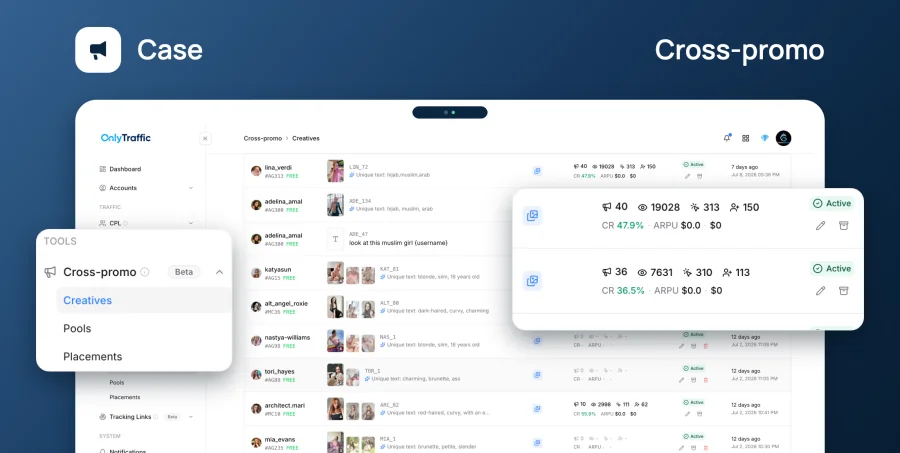
OnlyTraffic shipped a Shoutouts tool that runs the whole rotation on its own. The first setup took us about 15 minutes. Every model after that was under 10. Here's exactly what we built.
Step 1: Building the creatives
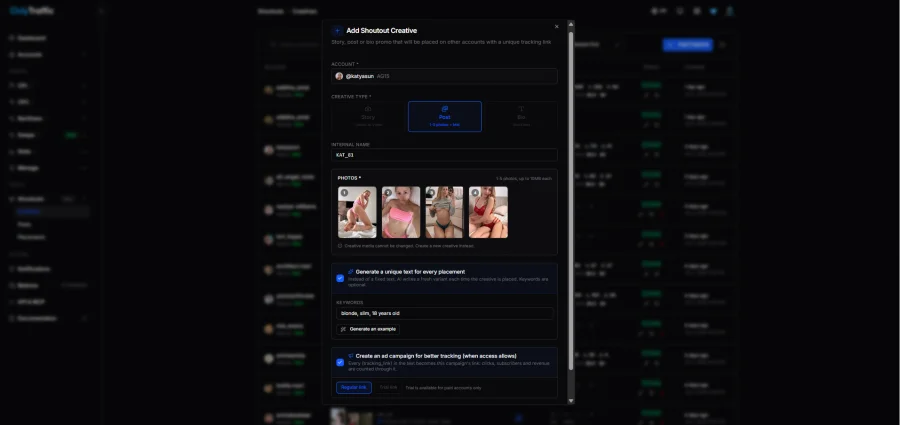
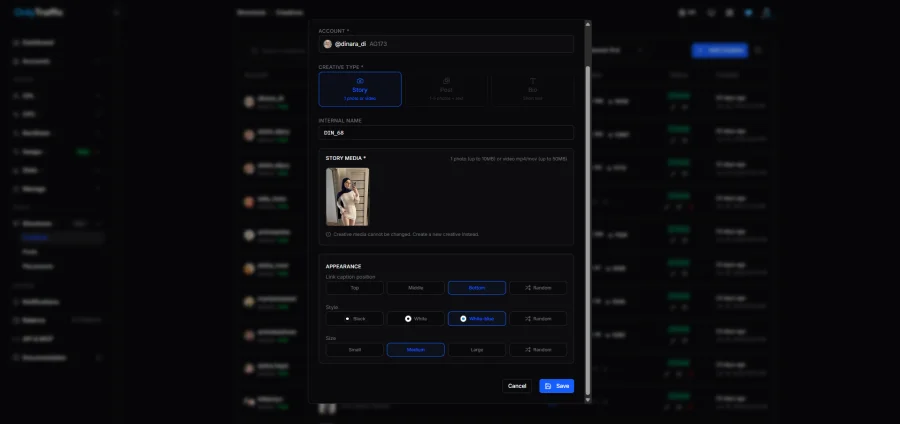
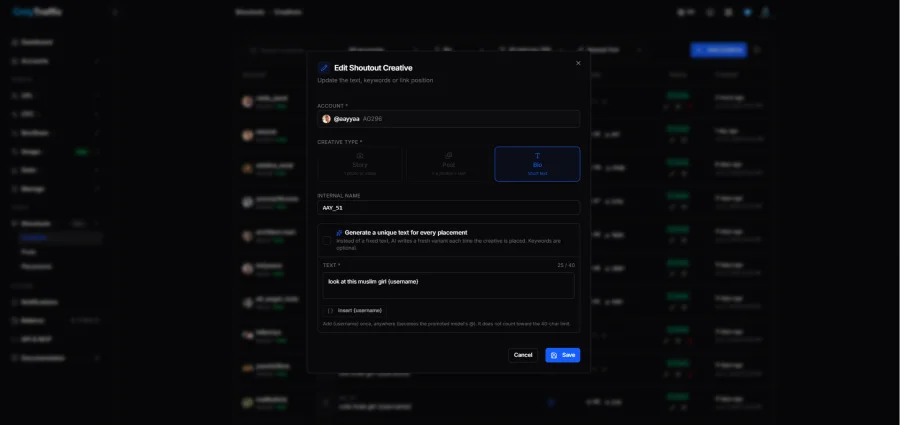
It all starts with creatives. There are three kinds, one per placement: a feed post, a story, and a bio line. Each has its own settings, and none of it needed a manual to figure out.
We built all three for every model. The post and story creatives take an image plus caption text. The bio creative is the short line that slots into the profile description, with the page you're promoting tagged inside it.
Step 2: Pools set the schedule
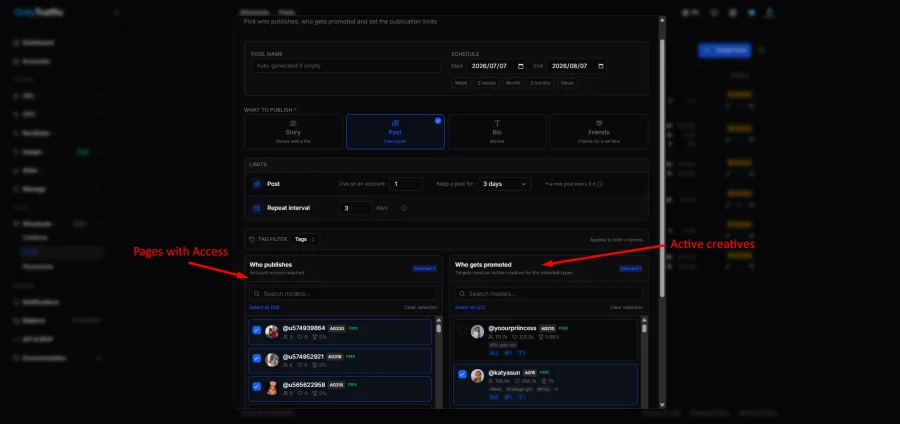
Once the creatives exist, you decide how often they run and from which pages. That's what pools are for. In the Pools section you pick the pages that will publish, attach the creatives you just made, and set the cadence and a start date.
Think of a pool as the rulebook: these pages, these creatives, this schedule. Set it once and the rotation handles itself.
Step 3: Watching it go live
After that you just wait for the start date you set. Everything that publishes shows up under Placements. The moment a post or story goes out, it lands in that list with a direct link, so you can click through and see the live post on the page.
Below is one on OnlyFans itself. The text and photo are pulled straight from the creative we set up earlier.
Start to finish, building a creative and setting up a pool took us 5 to 7 minutes per model.
By hand vs. on a pool
The change is easiest to see side by side. Same job, two very different amounts of work:
| By hand (before) | On a pool (now) | |
|---|---|---|
| Who runs it | A dedicated person, daily | Nobody, after setup |
| Time per model | Ongoing, every day | 5–7 min, once |
| Placements covered | Posts, stories, bios by hand | Posts, stories, bios, automated |
| Scheduling | Manual timing | Cadence + start date, set once |
| Consistency | Slips when the team is busy | Rotates on its own |
What the cabinet gets right is that nothing is missing. You build creatives for the model, create a pool, set the options, and launch. From there it runs and rotates by itself across posts, stories, and bios.
Where this works, and where it doesn't
A couple of honest notes, because this isn't free money for everyone.
- Automation buys you consistency and your team's time back. What you give up is the one-off personal touch of a human writing a bespoke shoutout for a specific moment. For daily rotation that trade is easy. For a big page launch, we still write those by hand.
- The 3,670 number isn't a trick. It came out of an audience we already had. If your pages are small, internal cross-promo recirculates a small pool and your ceiling is lower. It compounds as your roster and fan counts grow.
Short version: if you already run several pages and someone on your team does this manually, you're paying a salary for something a pool does for free.
Results
We ran part of our roster last month on this internal traffic alone, with nothing else feeding those pages. It brought in 3,670 fans across them. For zero spend, I'll take that every month.
On the pages we tracked, that landed around +30% in revenue for the period. The setup that produced it took 15 minutes the first time and under 10 for each model after. That's the whole case.