
OnlyFans shoutouts on autopilot. Stop running them by hand.

Cross-promo runs the SFS your team does by hand: stories, posts, mass messages, bio lines and friends pins, rotating across your own roster on a schedule. Set it up once, in about 15 minutes. Then it publishes, takes down and measures every placement itself.

What 1,000 story views turn into
1,000story views
2.8%
28new fans
14%
4of them pay
$187earned

Stories posted June 12 to August 6 across all Studio pools, measured on October 6: every fan had 60+ days to pay.

Got this page from your manager? Just reply there. We'll build your first pool with you on a call.

From a view to a paying fan.

Stories and posts from the first two months on every Studio pool, measured once their fans had 60+ days to pay. Stories carry no link, so Studio counts their fans by view; posts count them by tracking link. Earnings are what the fans spent, after the OnlyFans fee. How cross fans keep spending is in our OnlyFans subscriber LTV cross-analysis.

StoriesPosts
View to new fan2.8%1.1%
New fan to paying fan14%13%
Earned per new fan$6.64$11.64
Earned per 1,000 views$187$130

Friends pins and bio lines bring reach without a link, so they have no fan count. Mass messages started on September 21, too recently for a 60-day figure.

Five formats rotate. Hand-run SFS usually covers two.

Friends pins lead on reach: nobody keeps adding and removing friends on a schedule across a whole roster, so the engine does it on every account. Every view is free roster traffic; compare that with what paid OnlyFans advertising costs.

Averages per placement for a publisher with about 17K active fans

FRIENDS

Friends pins

A roster account sits in the top 3 of the publisher's friends for a set time, then gets swapped. No creative needed.

612views per pin, estimated
POST

Feed posts

1 to 5 photos and a caption with a tracking link. Posts stay up for days and keep collecting views until rotation replaces them.

255views per post2.8 new fans each
STORY

Stories

One photo with the promoted model's tag, live for 24 hours. The high-frequency slot, and fans who watched it are counted by view.

118views per story3 new fans each
MASS DMNew

Mass messages

A promo message to the publisher's fans by OnlyFans lists, with VIP and do-not-message lists left out. The previous promo is unsent first.

34Kfans reached per mailing
BIO

Bio lines

A rotating line with an @mention on top of the publisher's bio. The original bio stays.

268views per rotation, estimated

The median publisher across Studio pools, June 12 to October 6, 2026; bigger accounts get more views per placement. Story, post and message numbers come from OnlyFans; friends and bio views are estimated from the publisher's profile visitors.

Or set it up in a chat

Ask the AI assistant in Studio, or connect Claude or ChatGPT through our MCP server: create a pool, change its limits, pause it or check mass message lists in plain words. In Studio, the assistant shows every change for you to confirm first.

Connect the MCP server

Three steps, then it runs itself.

Real Studio screens, filled with sample data.

1

Add creatives for every model

Story photos, post sets, mass messages and bio lines. AI can write a fresh caption for every placement, and every post and message creative gets its own tracking link, so you see which one converts.
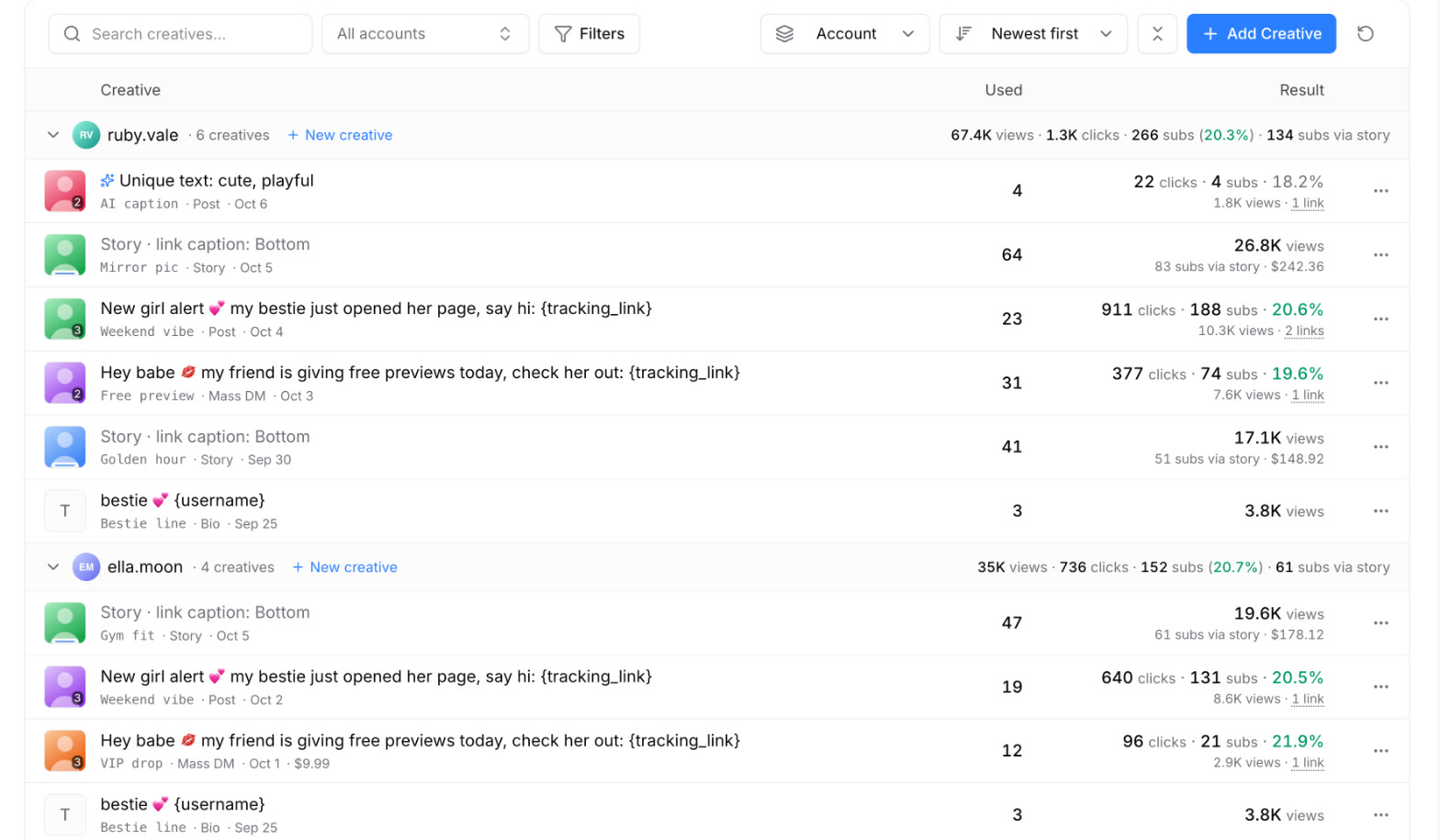
  • Recent photos attach without uploading again
  • CR turns green once a link has 30+ clicks
  • Story tag position, style and size per creative
Studio: creatives grouped by model with uses, clicks, subscribers, CR and revenue
Creatives: what each one brought, by model.
2

Build a pool in one form

Pick who publishes and who gets promoted, switch on the formats and set the limits. Before you save, the form shows how many publications and mentions the pool will make, and who it will skip.
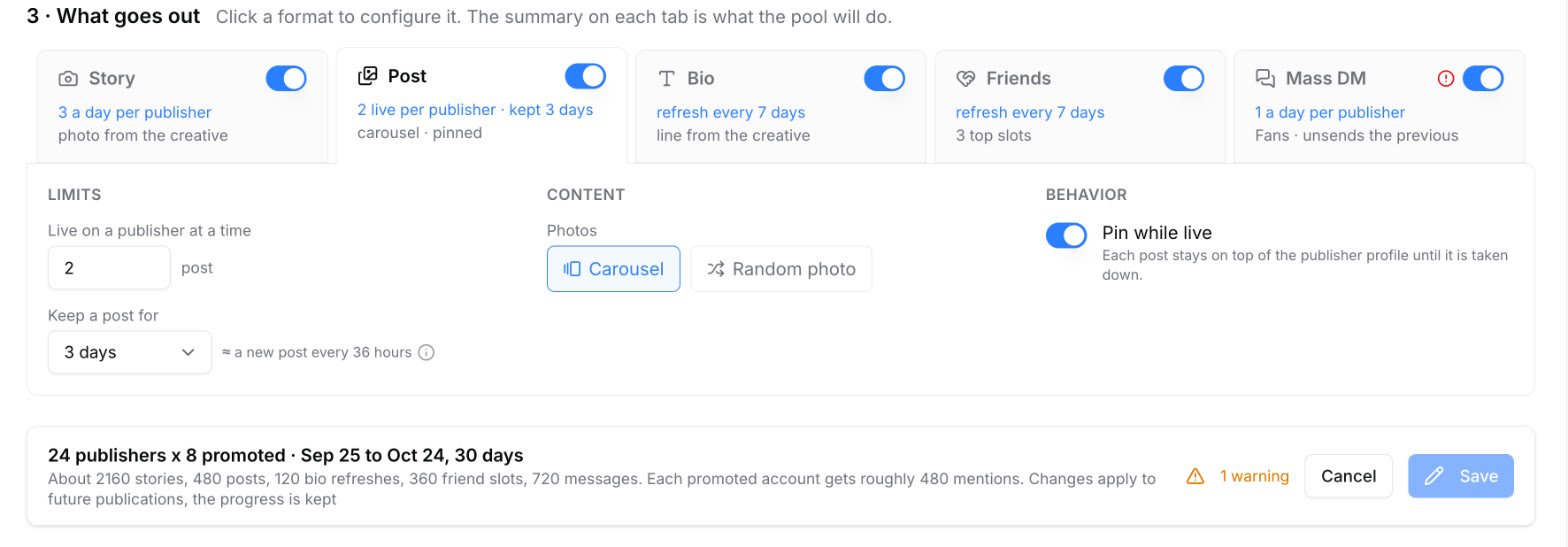
  • Five format tabs, each with its own limits
  • A repeat interval so no account repeats a model
  • Forecast and warnings before you save
Studio: pool form with five format tabs, post limits and the forecast bar
Pool form: formats, limits and the forecast.
3

Watch it run

Every placement lands in one feed with its views, clicks and subscribers. Warnings say when an account lost access or a model has no creative, with a link to fix it.
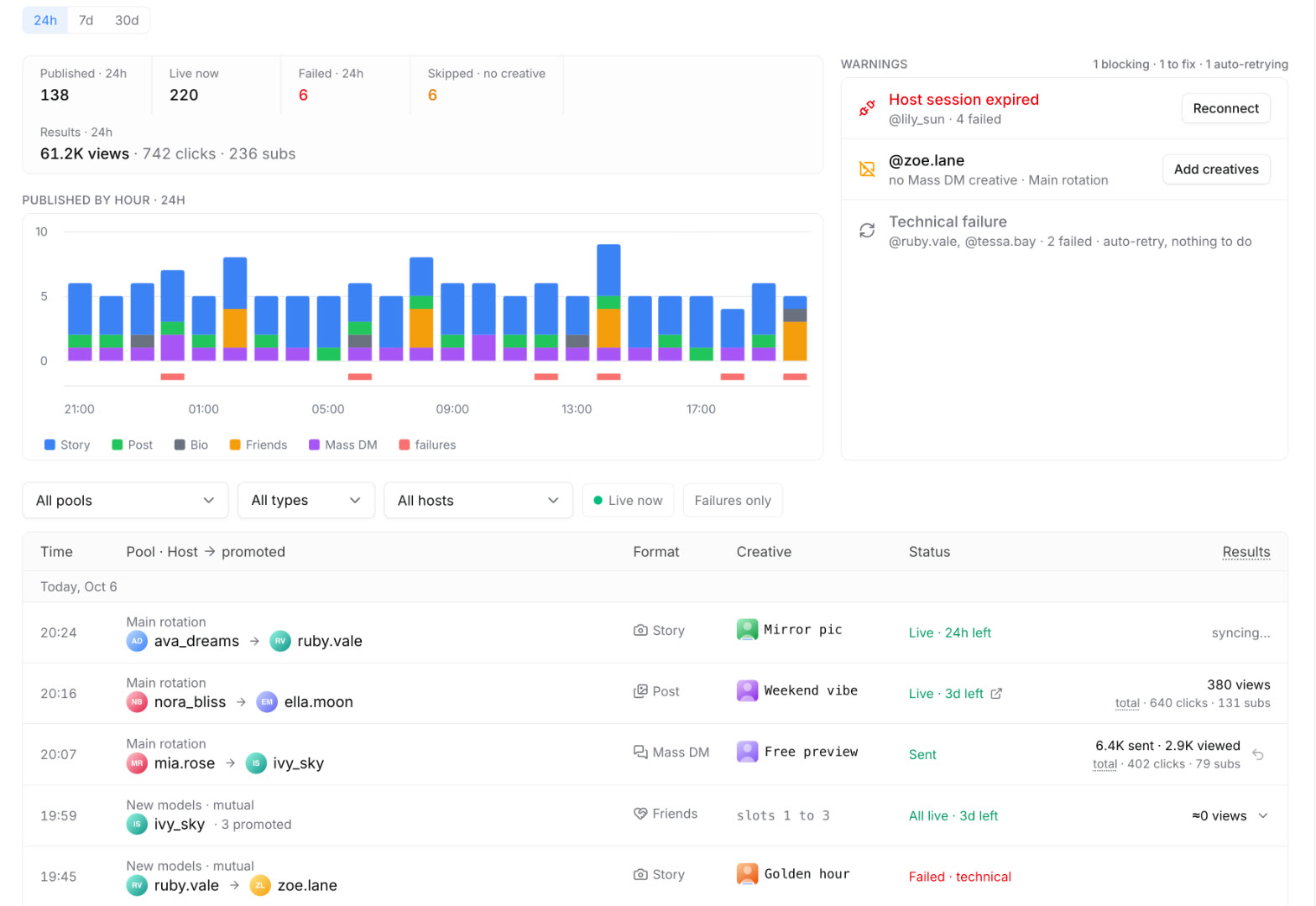
  • An hourly chart: a dip means rotation stalled
  • Warnings sorted by what blocks the pool
  • Views, clicks and subscribers per placement
Studio: placements feed with counters, hourly chart, warnings and the log
Placements: the live feed of everything that went out.

Everything a person would forget, done on schedule.

What the engine handles for every pool, around the clock.

Spreads every format through the day

Daily caps per publisher, publications evenly spaced, never in a burst.

Keeps the repeat interval

The same model does not show up on the same account in the same format more often than you set.

Rotates on schedule

Stories come down after 24 hours, posts get replaced, bio lines and friends pins refresh on their own.

Unsends the previous promo

Before a new mass message reaches a fan, the last promo message to that fan is taken back.

Checks the lists first

Send to and exclude lists are matched on every account before launch, so a typo shows up right away.

Verifies every placement

A story deleted by hand or a post OnlyFans rejected is flagged, not counted.

Retries and warns

Temporary errors are retried. An account without access is skipped, with a link to fix it.

Cleans up after itself

Pins posts while they are live and can clear published media from the vault.
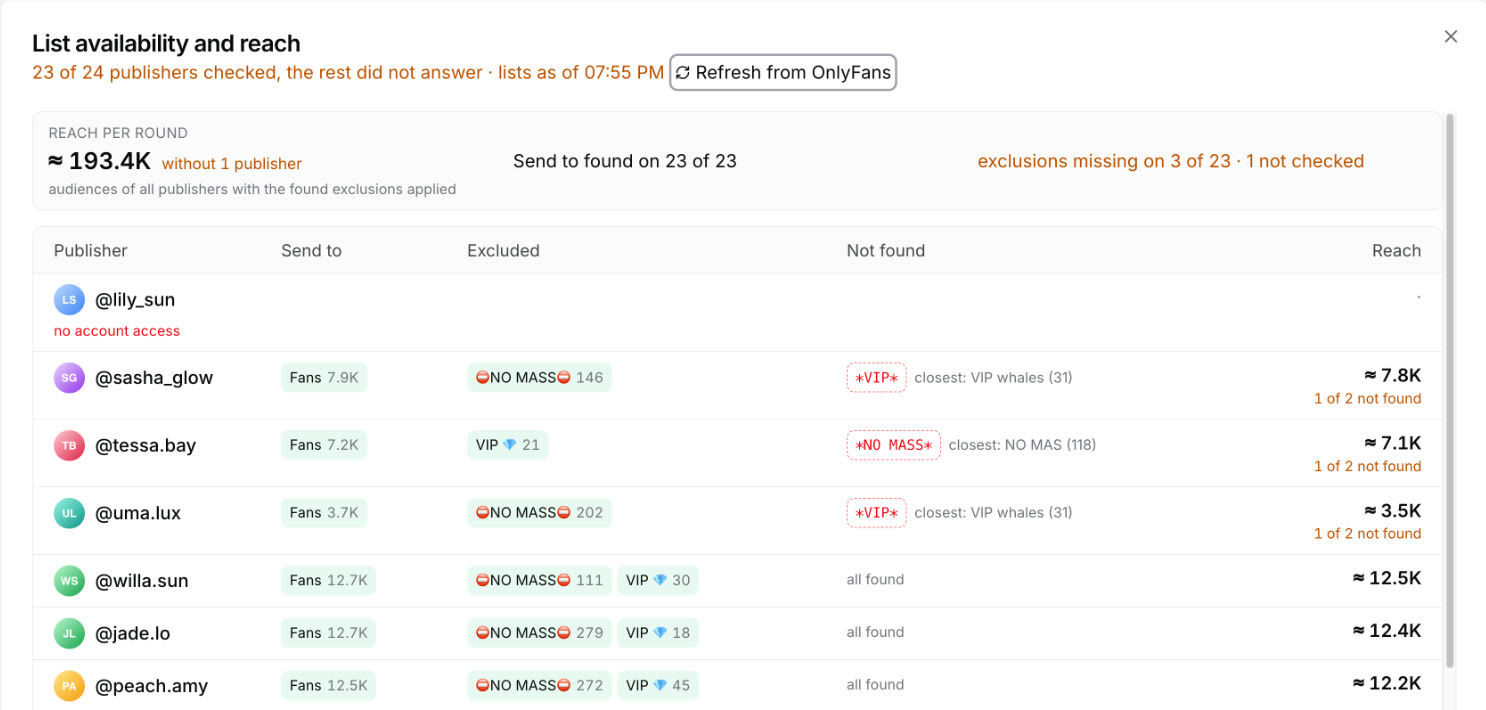
Studio: list availability and reach check for a mass message across publishers
The list check before a mailing: reach per account, exclusions found, a typo caught, an account without access.

Every placement measured.

Exact where OnlyFans gives exact numbers, labeled as an estimate where it does not. The pool page shows the plan against what went out, results by format and who brought the fans.

  • Story and post views come from OnlyFans, and so do sent and viewed counts of mass messages.
  • Fans by story view are counted about 26 hours after a story: viewers who subscribed while it was live and came through no other campaign.
  • Tracking links on posts and mass messages count clicks, subscribers and their revenue for every creative.
  • Bio and friends reach is an estimate from profile visitors, and Studio labels it as one.

On the Performance page in Studio, what fans from your CPL and CPC orders spend on other roster accounts through cross-promo counts as cross revenue of those orders.
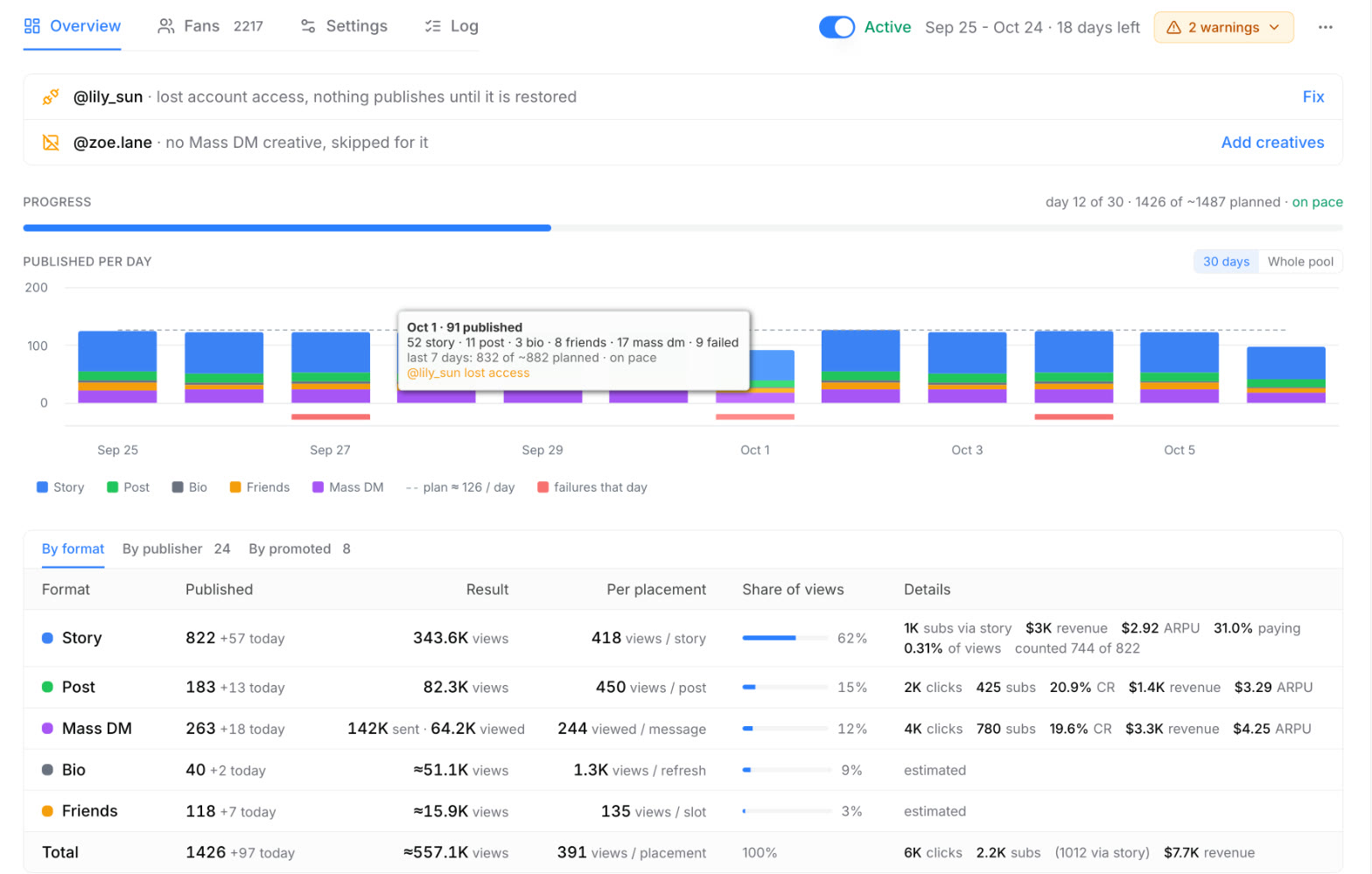
Studio: pool overview with warnings, progress, publications per day and results by format
Pool overview: progress against the plan, publications per day, results by format.
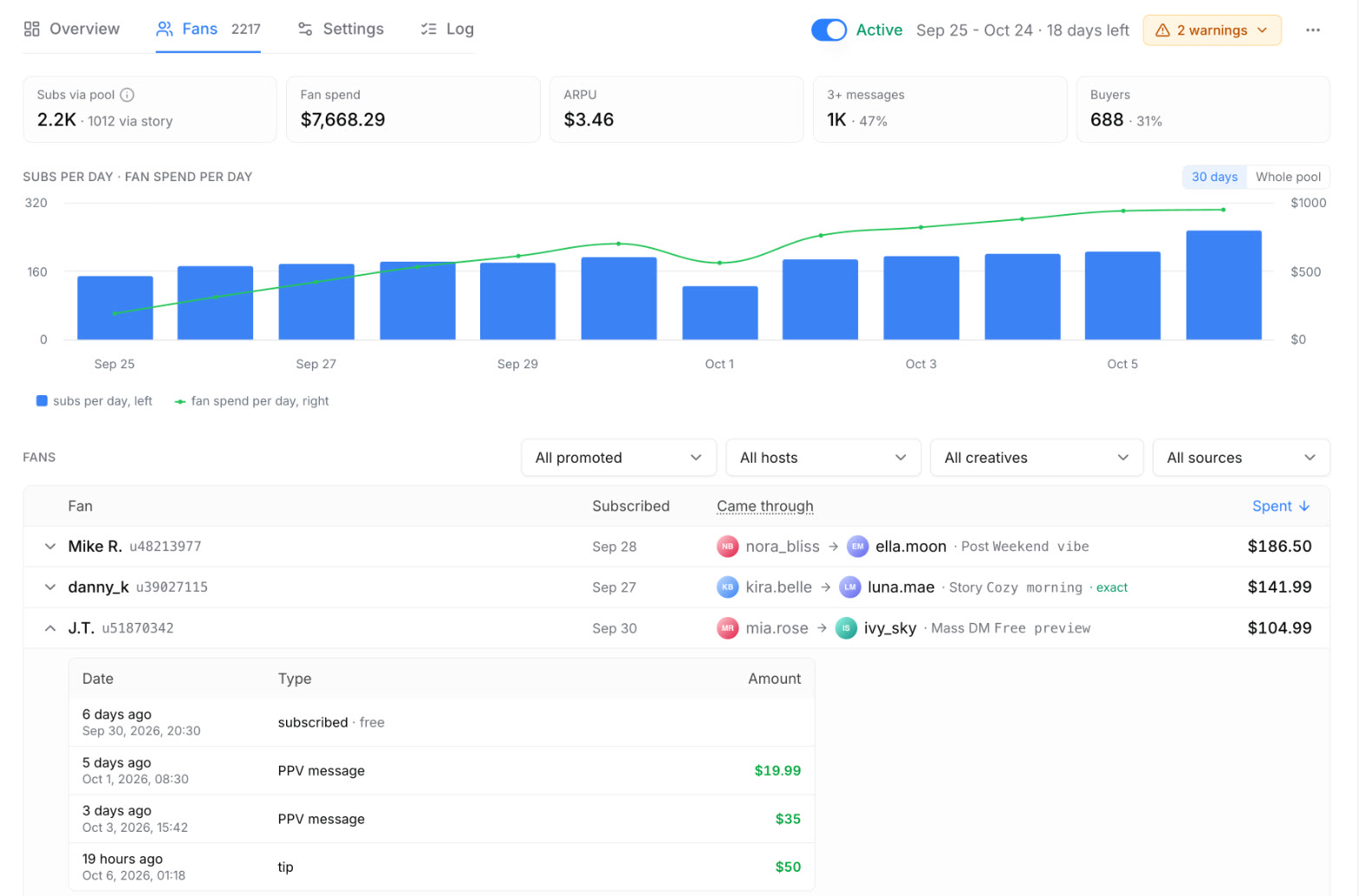
Studio: pool fans tab with totals, daily chart and a fan with the payment history open
Fans: who the pool brought, where each one came from and what they spent.

Manual SFS against Cross-promo

By handCross-promo
Planning A spreadsheet and reminders in a chat One pool with a schedule and limits
Formats Stories and the odd post Stories, posts, mass messages, bio lines, friends pins
Repeats and caps Whatever someone remembers Enforced on every account
Taking things down Forgotten stories and stale bios On schedule, then replaced
Results Screenshots and guesses Views, clicks, subscribers and revenue per placement
When something breaks Noticed days later A warning with the fix, the same hour

An agency that switched, in their own words.

“A person used to do this for us, by hand. Now it's fully automated: stories, bio, posts. Made the creatives, built a pool, set the schedule, launched. Everything rotates on its own.”
Agency running part of its roster on Cross-promo since June
61 accounts in 13 pools, all rotating on schedule
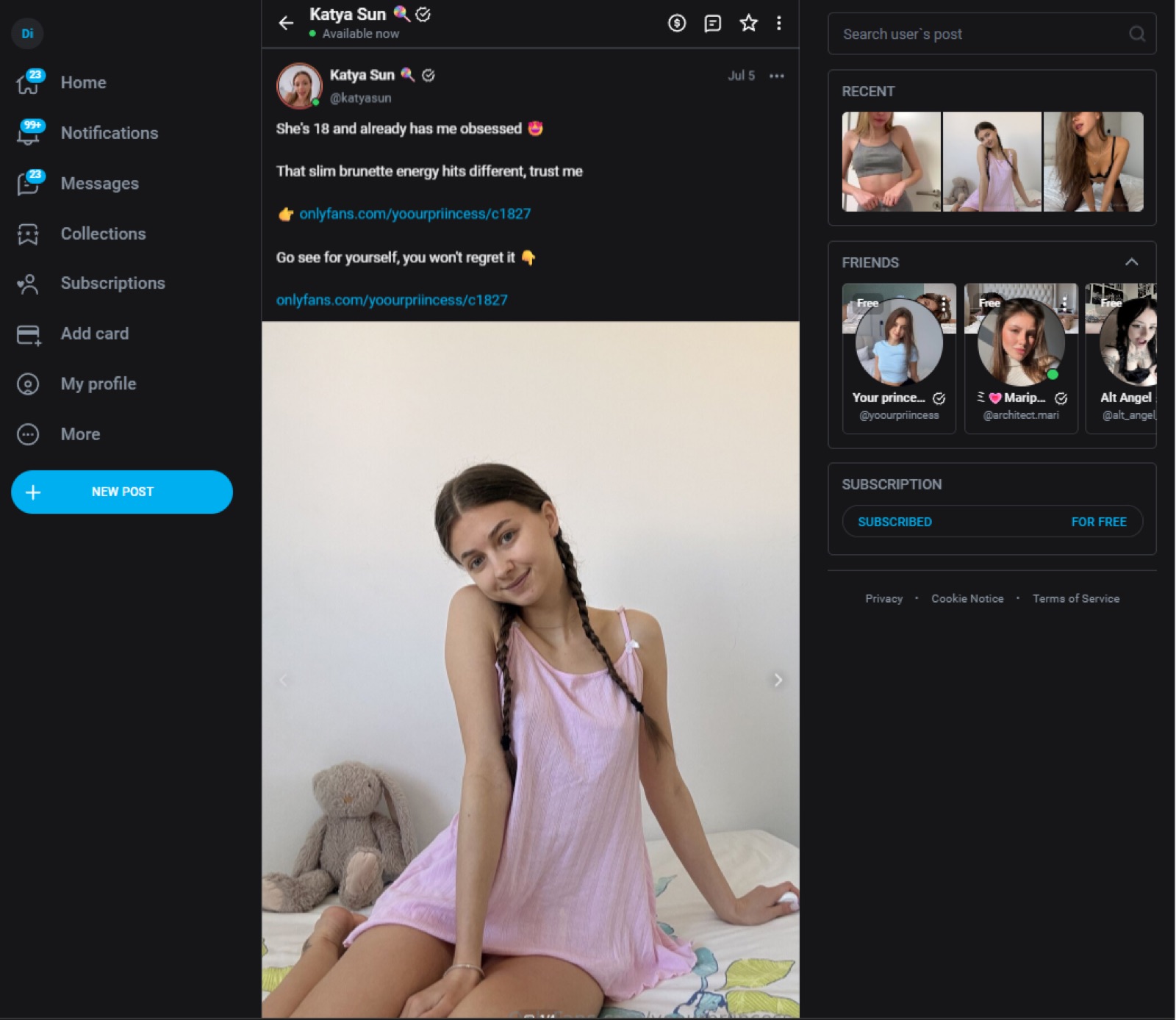
A live shoutout post on OnlyFans: one roster account promoting another, with the creative's photo, text, and tracking link
A placement live on OnlyFans. Photo, text, and tracking link come straight from the creative.

Cross-promo FAQ

The questions we get from teams who already run cross-promo by hand.
  • What exactly does the Cross-promo tool automate?
    The full shoutout cycle between your own models: publishing stories, posts, mass messages, bio lines and friends pins, taking them down on schedule, replacing expired ones and counting what each placement brought. What used to be a spreadsheet and a chat with reminders becomes a queue that runs itself.
  • Which format performs best?
    They do different jobs. Across every pool since June, a friends pin averages about 610 estimated profile views, a post about 255 and a story about 120, while one mass message reaches about 34,000 fans on average. Posts and mass messages carry tracking links, so you see clicks, subscribers and revenue directly; stories count fans by view. Mature pools rotate all five.
  • Do I need to give account access?
    Yes. Publishing runs through Studio, so each model in a pool needs to be connected with account access. That is also what makes verification possible: the tool checks that every placement is actually live.
  • What results should I expect?
    Across all pools, 1,000 story views bring about 28 new fans, and after two months 14% of them have paid; a post brings fewer fans per view, but each of its fans has spent almost twice as much. Cross-sales contribute 20-80% of total fan revenue for a typical agency portfolio. In the case above, the cross share of monthly cohort revenue went from 31-34% with manual SFS to 53% in the first month of Cross-promo. From June 12 to October 6 the same agency got 43.5K new fans from Cross-promo and has earned $260K from them so far.
  • How is this different from GG swaps?
    GG swaps exchange fans with creators outside your roster, with matched and tracked volumes on both sides. Cross-promo automates placements inside your own roster, where the traffic is free. Agencies usually run both.
  • Our SMM person already handles cross-promo.
    Keep them on creatives, where taste matters. The machine takes the calendar: rotation, daily caps, post lifetimes, repeat intervals, logging. And it runs friends and bio rotation at a scale no human keeps up with; friends pins are the surface with the biggest reach across live pools.
  • Will it flood my accounts?
    You set the limits per pool: stories and mass messages per account per day, how long a post stays up, and a repeat interval so the same model isn't promoted on the same account twice in a row. The rotation respects them.
  • Do we have to stop doing it manually?
    No. Do what the case agency did: put part of the roster in one pool, leave the rest as is, compare after a month. The numbers section above is that comparison.
  • Is it safe to send mass messages to our fans?
    You pick the OnlyFans lists a message goes to and the lists it never reaches, such as VIPs or fans who asked not to be messaged. Studio checks those lists on every account before launch, keeps the daily limit you set and unsends the previous promo message before the next one reaches the same fans.
  • Can we promote models outside our agency?
    Cross-promo works inside your own roster. For exchanges with other agencies there is the Shoutouts exchange in Studio, and for matched fan swaps with tracked volumes there are GG swaps.

Cross-promo is already sitting in your Studio.

Tools → Cross-promo → Pools. First rotation live in about 15 minutes.

Open Cross-promo in Studio

Or reply to your manager and we'll set up the first pool together.

Contact Us

Sign up for a free consultation

Need help getting started? Our experts are ready to guide you.