

Managed offers are opened for an account by your manager. If there is none in CPL → Partner Offers, ask your manager which Managed offers fit your account.
How It Works
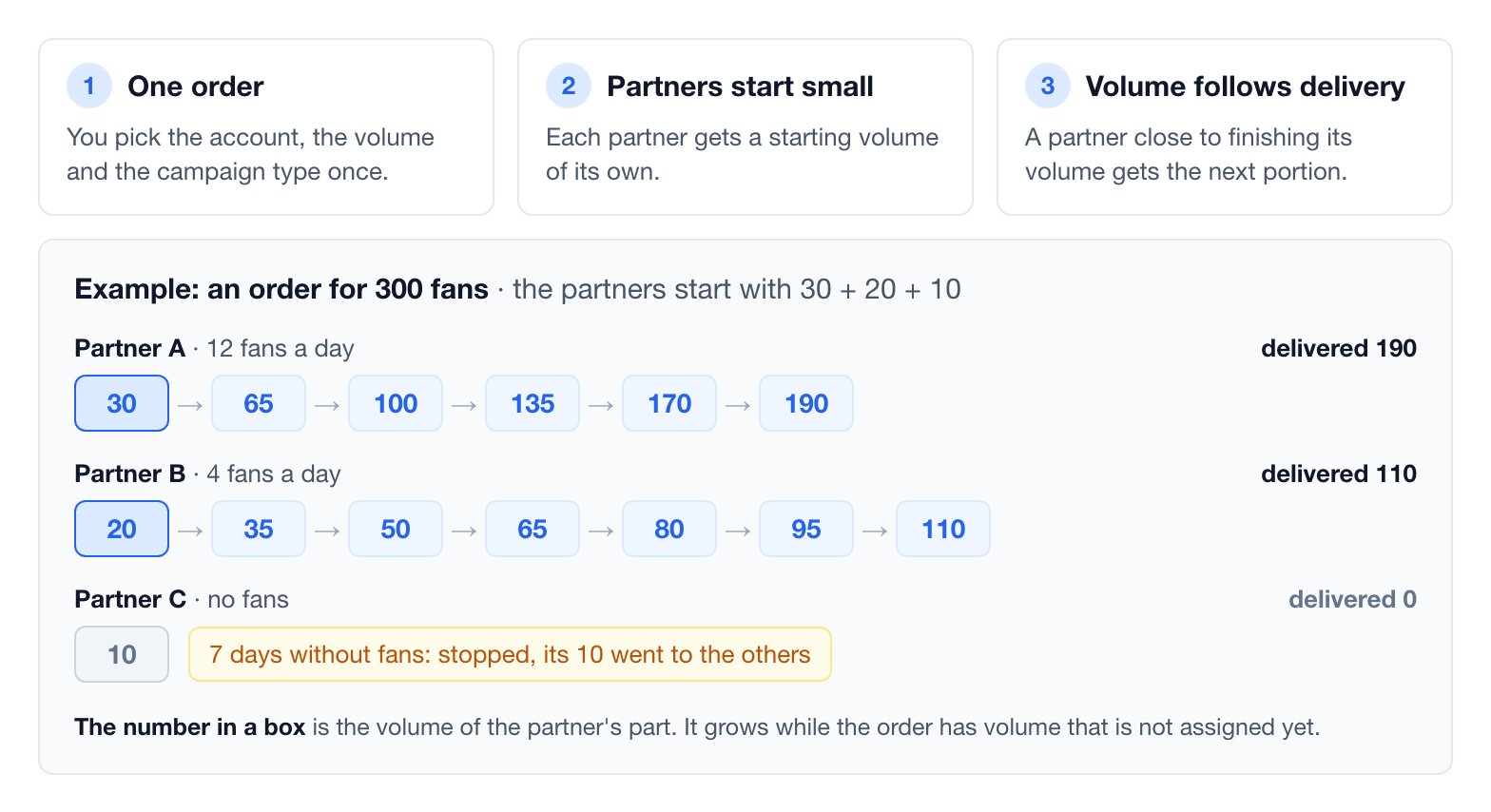
1
You place one order
Pick the account, the number of fans and the campaign type. Before you confirm, the form shows the expected price, what is held now and which partners start.
2
Each partner starts with a small volume
Every partner in the offer has a starting volume of its own, for example 30, 20 and 10 fans. The rest of your order is not assigned to anyone yet.
3
Volume follows delivery
A partner that is close to finishing its volume gets the next portion. Fast partners end up with the larger share, and nobody has to re-split the order.
4
A partner that stalls is stopped
If a partner brings no new fans for 7 days (an offer can set another period), its part is stopped and the volume it did not deliver goes to the others.
5
The order ends when the volume is delivered
Whatever is left of the hold returns to your balance.
In the Catalog
A Managed offer is a row of the same Partner Offers table, found by the same search, filters and sorting as partner offers.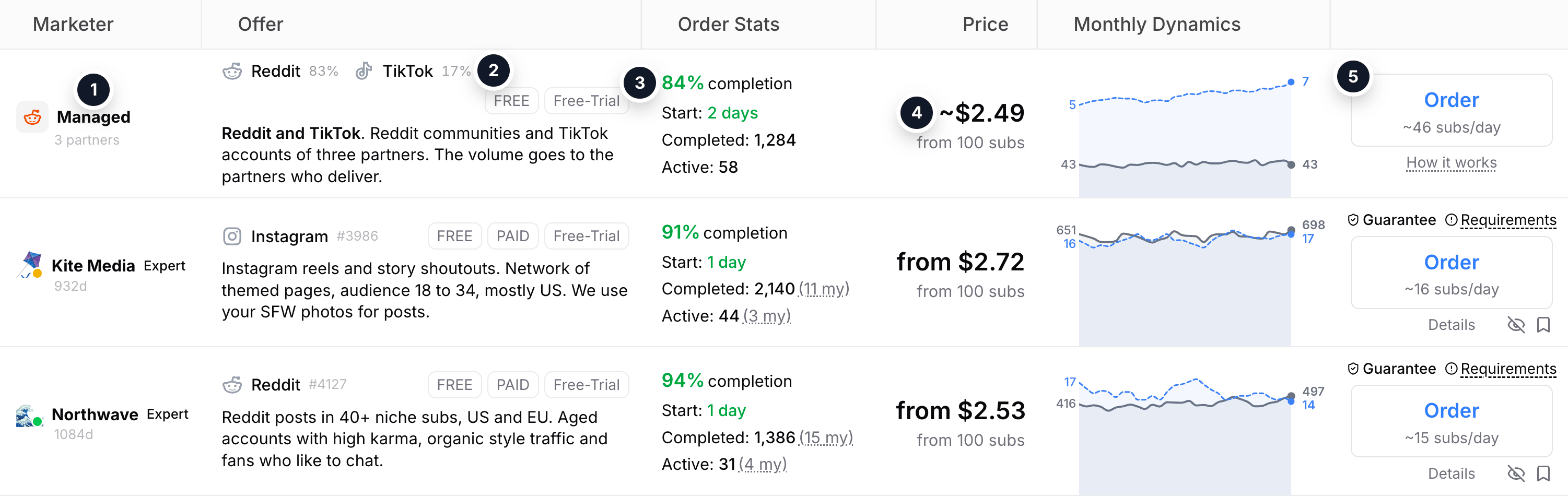
Sample data: a Managed offer in the catalog
- Managed and the number of partners. If the offer shows its partners, hover the count to see them with their expected shares.
- Sources and campaign types, then the name and the description of the offer.
- Order Stats and Monthly Dynamics: the same numbers as for a partner offer, added up over the partners.
- Price with a
~: the expected average price per fan at your tier. Hover it for the price range of the partners. Under it is the minimum order. - Order with the speed: the partners’ speeds added up.
Placing an Order
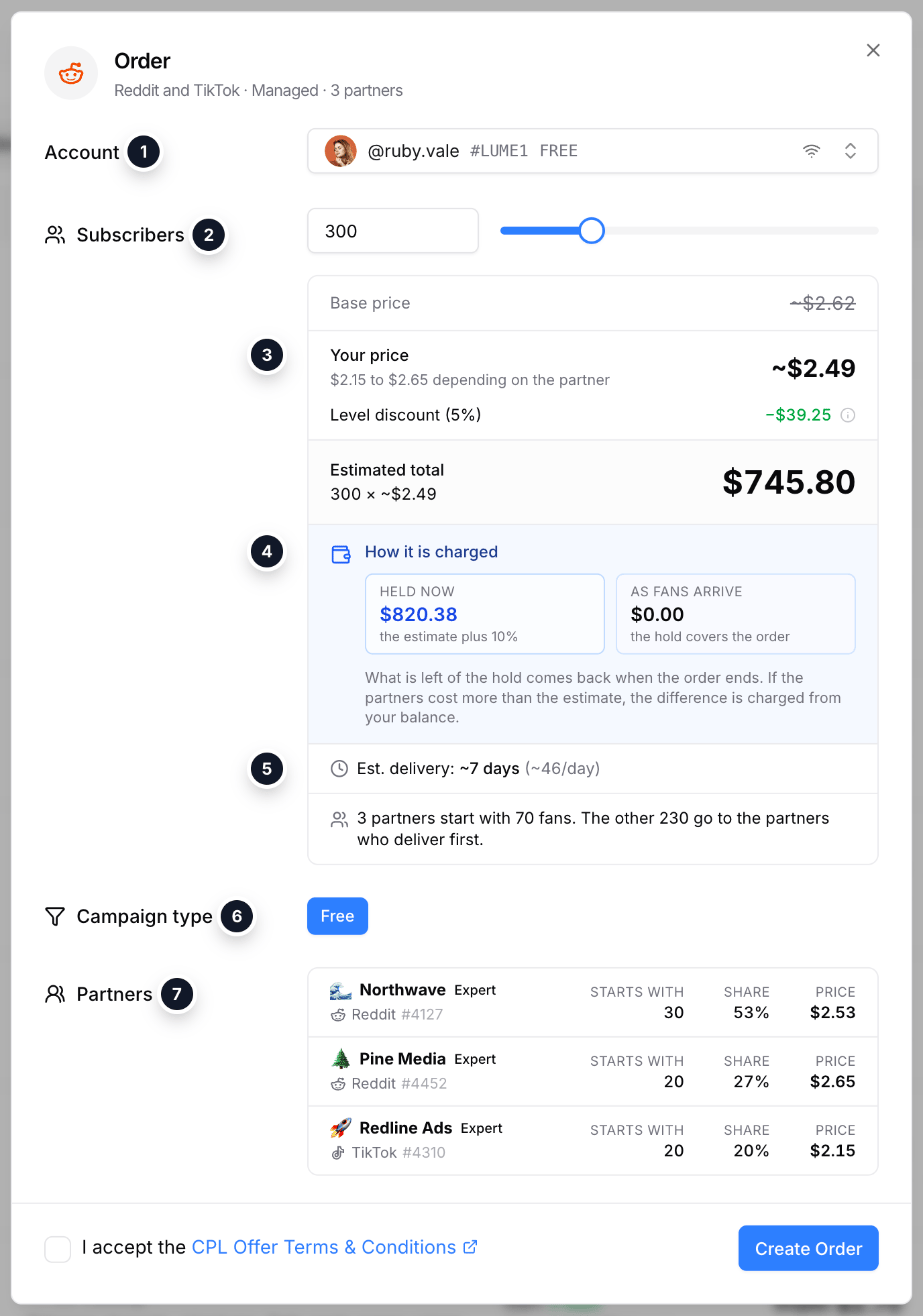
Sample data: the order form of a Managed offer
- Account: the page that receives the traffic. The account needs connected access. An account with an open order of this offer is marked has an open order: add volume to that order instead of placing a second one.
- Subscribers: the volume of the whole order. The offer sets the minimum, and may set a maximum.
- Price: the base price, your price with the tier discount, and the estimated total. Partners differ in price, so your price is an expected average and the range is shown under it.
- How it is charged: what is held now and what is charged as fans arrive.
- Est. delivery and the start: how many partners start, with how many fans, and how much stays unassigned for the ones who deliver first.
- Campaign type: the types the partners of the offer take and your page allows. With a free trial you also pick the trial length.
- Partners: who starts, with what volume, the expected share and the price of each. A partner that cannot take this account right now is listed with the reason.
Price and Billing
Each partner keeps its own price, with your tier discount applied. The number in the catalog and in the form is the expected average. The final average depends on who delivers more. When the order is created, a part of the estimate is held on your balance:
Some Managed offers hold 20% for every account. The form always shows the exact amount before you confirm.
Delivered fans are charged once a day: from the hold while it lasts, then from your balance. When the order ends, the unused hold returns to your balance.
Example. You order 300 fans, the expected price is $2.90, the estimate is $870.
- Pay-as-you-go: $174.00 is held now. Fans are charged from it first, then from your balance as they arrive.
- Prepaid: $957.00 is held now (the estimate plus 10%). If the order costs $870.00, $87.00 returns when it ends.
Following the Order
A Managed order is one row of CPL → Orders, marked Managed. Its campaign numbers (fans, purchases, messages, revenue, ARPU, ROMI) are totals over all the partners.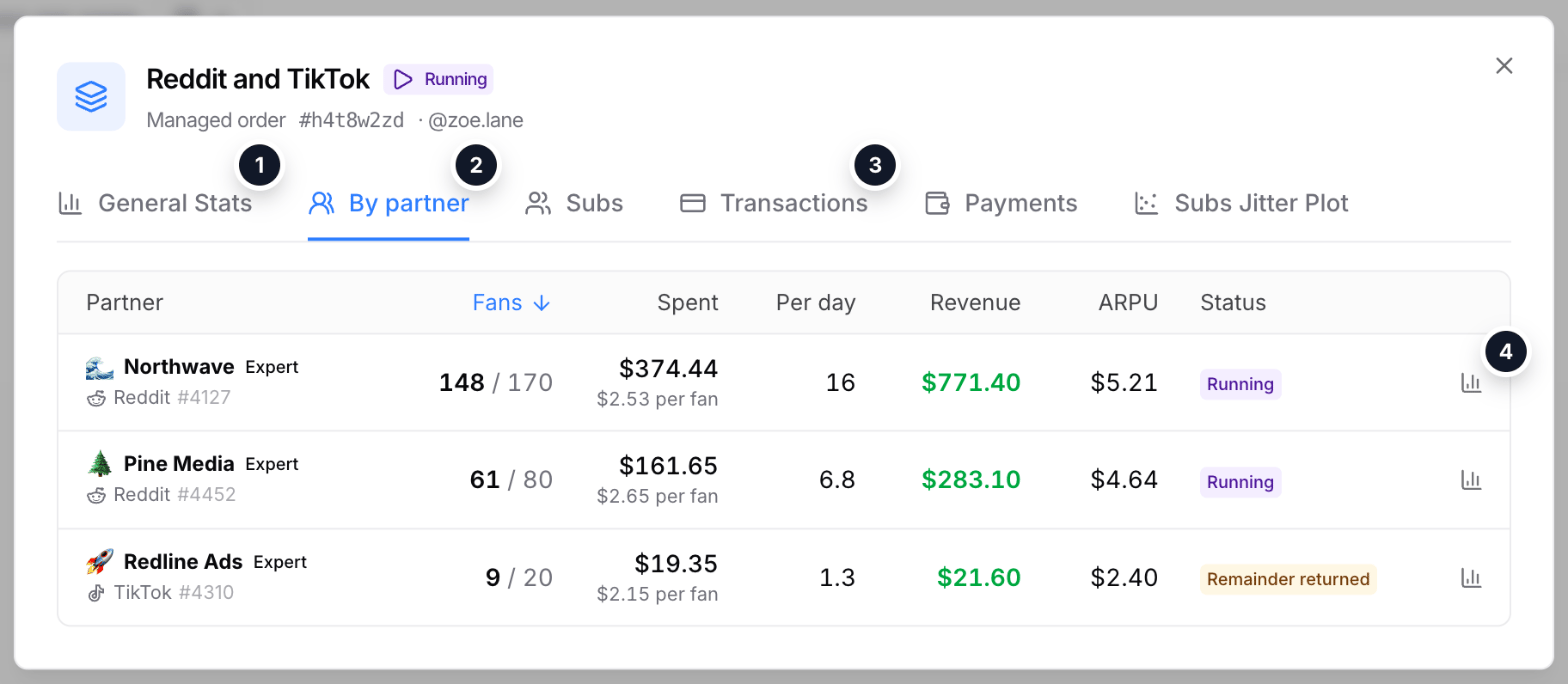
Sample data: the By partner tab of a Managed order
- General Stats: how much is delivered, how much is with the partners and how much is not assigned yet, the average price so far, the hold and the Add volume button. Below are the usual financial overview and campaign statistics with link clicks and conversion.
- By partner: one line per partner with its fans, spend, speed, revenue, ARPU and status. Click a column to sort.
- Subs, Transactions, Payments: the same tabs as in any CPL order, for the whole Managed order at once.
- The chart icon, or a click on the line, opens the regular statistics of that partner’s part.
Adding Volume and Stopping
Add volume is in the order row and in the order window. Enter the number of fans: the window shows what is held for the added part (by the same rule as for the order) and the volume after. The added fans are split between the partners the same way. A Managed order cannot be stopped from Studio. Ask your manager: they can let the partners finish the volume they already have, or stop everything at once. Delivered fans are paid for, the unused hold returns to your balance.Notifications
You get a notification when the order is created, when volume is added, when it needs a top-up, when no partner can take the rest, and when it ends with the totals: fans delivered, average price, cost and the amount returned. The button opens the order, or your wallet when a top-up is needed.FAQ
Can I choose the partners?
Can I choose the partners?
No, the set of partners belongs to the offer. You can keep a partner out of your orders by hiding its offer or blocking the partner: it is then skipped.
Why is the price approximate?
Why is the price approximate?
Partners in one offer charge different prices and nobody knows in advance who delivers how much. The expected price assumes the shares the form shows. The By partner tab shows what each partner actually delivered and cost.
Can an account have two orders of the same Managed offer?
Can an account have two orders of the same Managed offer?
No. One account has one open order per Managed offer. Use Add volume to get more.
What if my balance runs out?
What if my balance runs out?
The order gets the Paused: balance status: partners finish the volume they already have, no new volume is given out. Top up and it continues by itself. Fans that were delivered are due in any case.
Is there auto-renewal?
Is there auto-renewal?
No. A Managed order has one volume. When you need more, add volume to the open order or place a new one after it ends.
Where do I see the charges?
Where do I see the charges?
Daily charges for delivered fans are in the Payments tab of the order. The hold and its return are in your wallet.
Next Steps
CPL Overview
How CPL works on OnlyTraffic
Pay-as-you-go
The 20% deposit and per-fan billing
Loyalty Tiers
How tiers and discounts are calculated
Refund Policy
What happens if an order doesn’t go as planned