

Creative formats
Text: your own or AI
For posts, Mass DM and bio you can turn on “Generate a unique text every time” instead of a fixed text:- every publication gets a fresh text, no two are the same;
- keywords set the model’s vibe, for example
cute, playful; - “Generate examples” shows 3 variants before saving, and any of them can become the fixed text.
Photos
- Recent uploads: when you create a story or a post, the strip shows the model’s recent photos. A click attaches a photo without uploading it again.
- Order: in posts and Mass DM drag photos in the strip, the first one goes out first. The order can change later, even after the creative was used.
AI-generated images
OnlyFans asks to label AI-generated images. When a story or post photo was made with AI, tick AI-generated image in the creative form:- a post gets
#aiat the end of its text; - a story gets a small AI generated mark in the bottom-left corner.
Tracking link (posts and Mass DM)
“Create an ad campaign for better tracking (if access is available)” is on by default:- Regular link: an OnlyFans campaign such as
onlyfans.com/model/cNNN, counts every click. - Trial link: a free trial for 1 day to 1 year. Paid pages only.
- The campaign counts clicks, subscribers and their revenue. Every creative has its own link in a pool, so conversion can be compared between creatives.
- No access to create a campaign: the publication still goes out, with a profile link.
Once a creative has a tracking link, tracking cannot be switched off: its results live on that link. For publications without tracking, create a new creative.
Creative results
Sort by CR, usage or views to find the best creatives. How story fans are counted is on the Placements page.
Reading the list
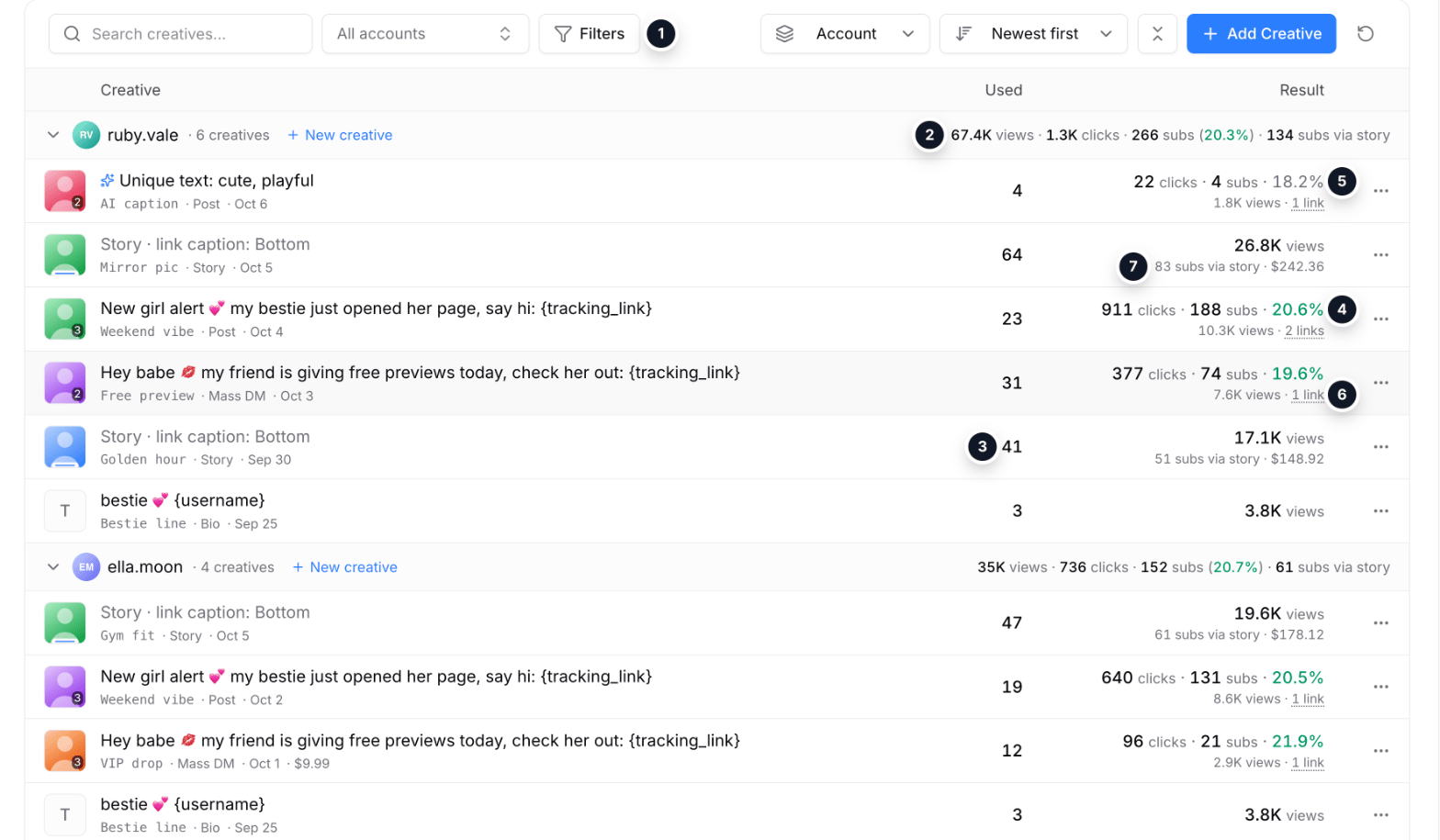
Sample data: the creatives list grouped by model
- Toolbar: search, model, Filters (format and status), grouping by model and sorting; newest first by default.
- Model totals in the group header: views, clicks, subscribers with the weighted CR of creatives with a link, and subscribers via stories.
- “Used”: how many times the creative went out. A click opens the placements log filtered to it.
- Green CR: the link has 30+ clicks, the number is reliable.
- Grey CR: fewer than 30 clicks, the data is still thin. Here a new creative with an AI text.
- “N links”: every tracking link of the creative, one per pool: posts, period, clicks, subscribers, CR and revenue.
- Story: fans by story view and their revenue instead of clicks.
How sorting by CR works
How sorting by CR works
First come creatives whose link has at least 30 clicks: their CR is green and already says something about quality. Then creatives with fewer clicks: CR is grey, the data is still thin. Last come formats without a link (story, bio) with their views; stories add fans by story view.