

How it works
1
A Mass DM creative on the promoted model
1-5 photos and up to 400 characters of text, free or paid. A tracking link is optional. How to create one: Creatives.
2
The Mass DM format in a pool
Mailings per publisher per day, the Send to and Exclude lists, unsending the previous mailing.
3
Check before launch
“Check availability and reach” shows, per publisher, which lists were found and how many fans the message reaches.
4
Sending and results
Mailings go out live from our scheduler. Placements show sent and viewed, the tracking link shows clicks, subscribers and revenue.
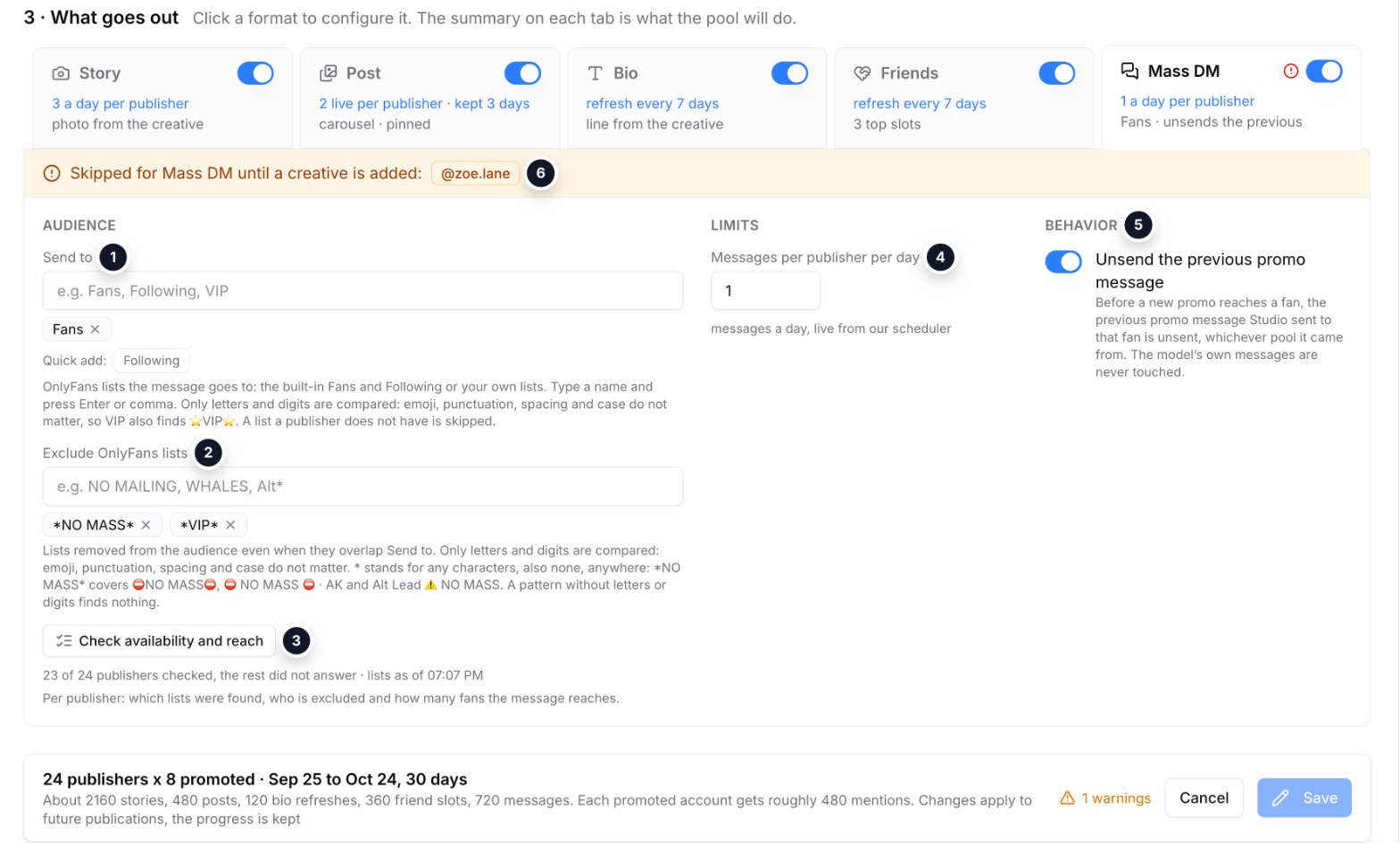
Sample data: the Mass DM tab of the pool form
- Send to: OnlyFans lists by name, the built-in Fans and Following or your own.
- Exclude: lists removed from the audience; a
*pattern catches similar names on every publisher. - Check availability and reach: a check on every publisher before launch (the result is below).
- Messages per publisher per day: they go out live from our scheduler.
- Unsend the previous promo message: before a new promo reaches a fan, the previous one is unsent, whichever pool sent it.
- Warning: a promoted model without a Mass DM creative is skipped until one is added.
Creative
When the text has
{tracking_link}, the creative gets a tracking campaign that counts clicks, subscribers and their revenue. More: Creatives.
Audience
- Send to: OnlyFans lists by name. The built-in Fans and Following, or your own lists. The format will not save without at least one list.
- Exclude lists: these lists are removed from the audience even when they overlap Send to.
*stands for any characters, also none:*NO MASS*covers every list with those words. - Up to 20 names in each field.
NO MASS finds both ⛔️NO MASS⛔️ and ⛔️ NO MASS ⛔️ · AK.
Checking the lists
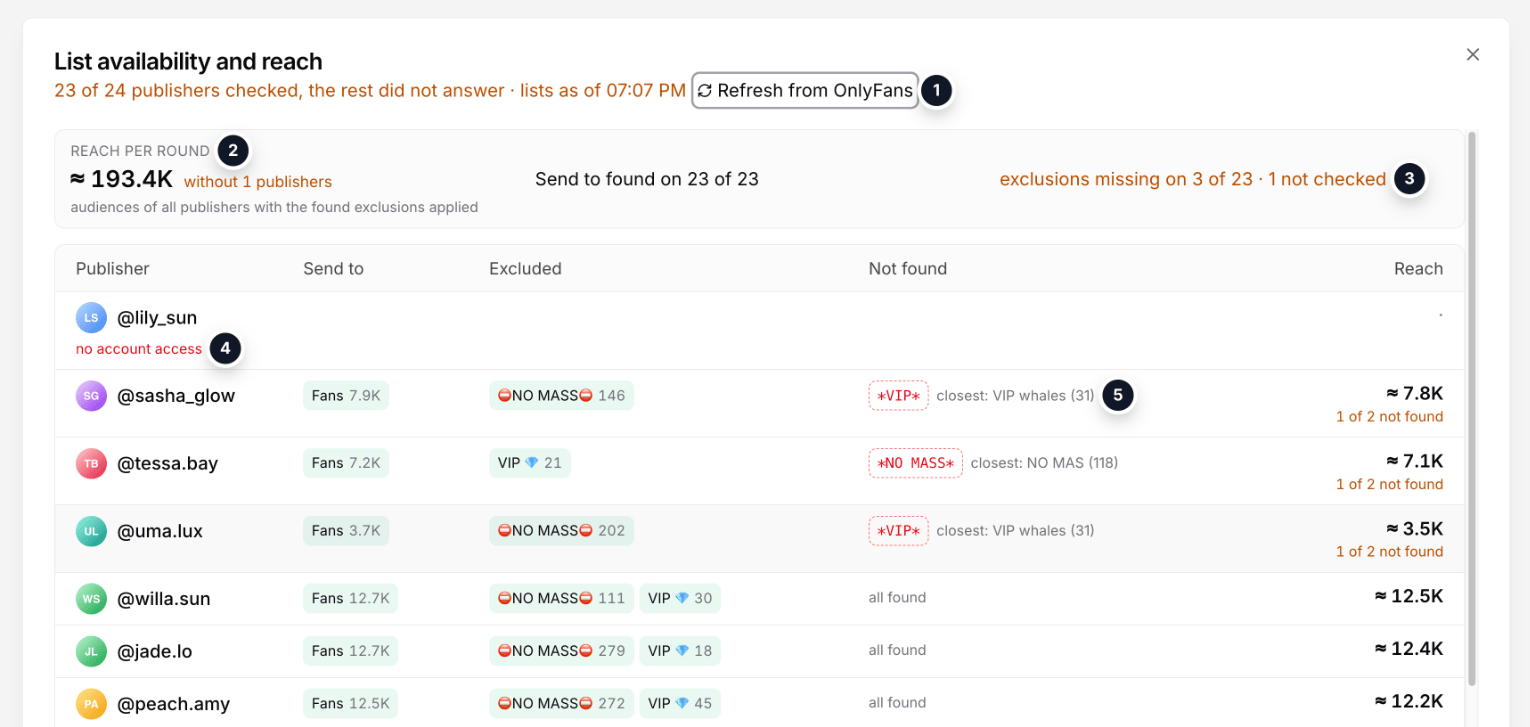
Sample data: the list check result
- Who was checked and when the lists were read. “Refresh from OnlyFans” re-reads them right away.
- Reach per round: the audience of all publishers with the found exclusions applied.
- Exclusions missing: on how many publishers an exclude list was not found, and how many were not checked.
- A publisher without access: it cannot be checked and sends no mailing.
- A pattern that found nothing, with the closest lists on that publisher: typos show up right away.
- which Send to lists were found and how many fans they hold;
- who is excluded;
- how many fans the message reaches in the end.
Limits and sending
- 1-5 mailings per day per publisher. OnlyFans caps mass messages per day, and the pool’s mailings share that cap with the publisher’s own, so keep the pool limit small.
- The pool’s repeat interval applies here too: the same promoted model does not appear in the same publisher’s mailings more often.
- Unsend previous (on by default): before a new mailing, the previous promo mailing to the same fans is unsent, whichever pool sent it.
A publisher with none of the Send to lists is skipped. A missing exclude list does not stop the send: the mailing goes out and the log carries a note naming the list. Fix the name before the next mailing.
Results
- Placements: a mailing shows sent, viewed and its status. A live mailing can be unsent by hand.
- Tracking link: clicks, subscribers and revenue appear in the creative row, on the pool page and in placements.
- Fans: subscribers through a mailing’s link land in the pool’s Fans tab with their source.
Common problems
A publisher sent no mailing
A publisher sent no mailing
It has none of the Send to lists, or it has no account access. Press “Check availability and reach” to see what was found. An access warning shows on the pool and on the placements page.
The log notes a missing exclude list
The log notes a missing exclude list
The mailing went out without that exclusion. Check the list name on the publisher or fix the pattern, for example add
* on both sides.Fewer mailings than the limit
Fewer mailings than the limit
The limit is a ceiling. Mailings are held back by the repeat interval, the number of promoted models with a Mass DM creative, and the publisher’s daily OnlyFans cap.