

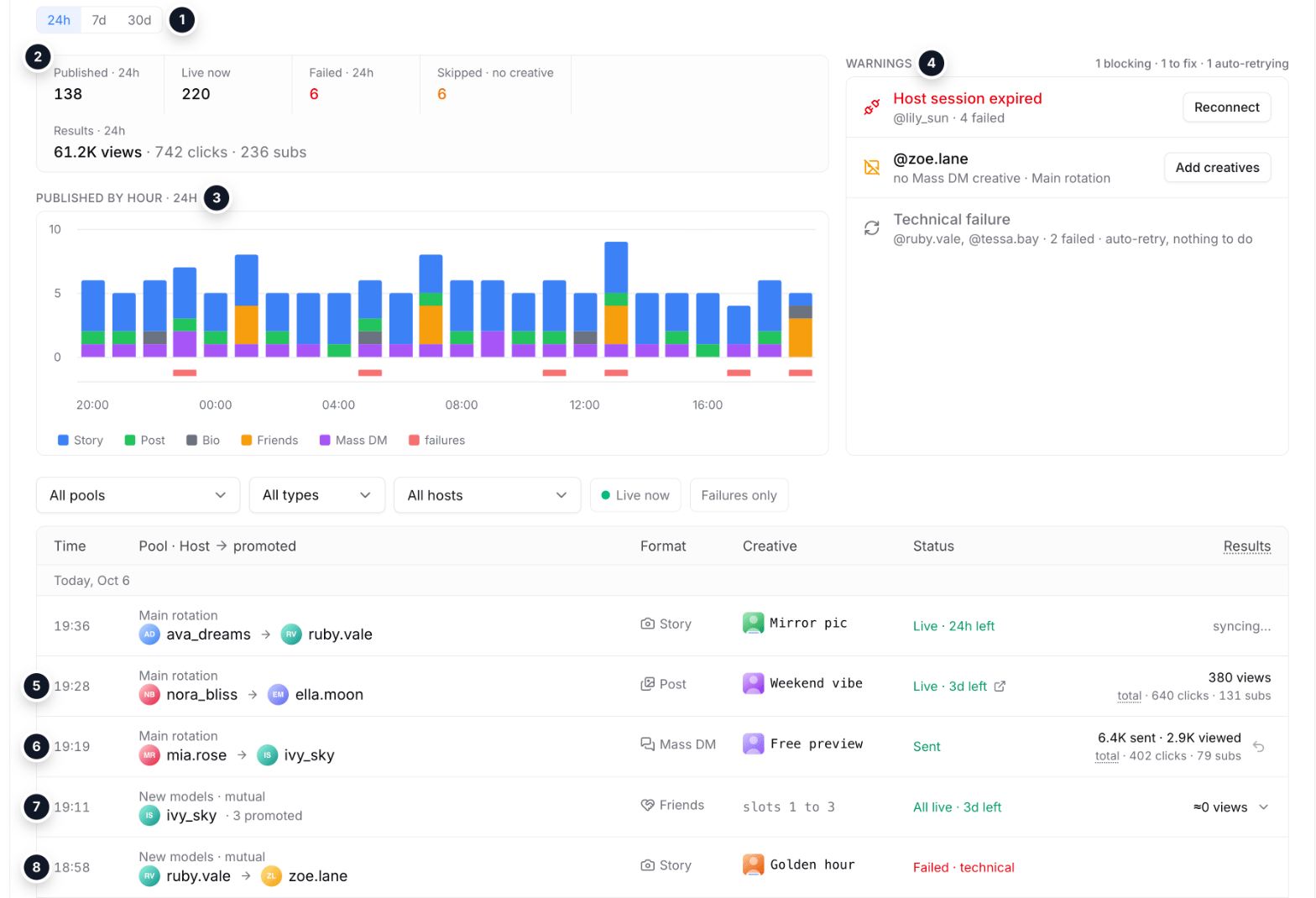
Sample data: the placements page for 24 hours
- Period: 24 hours, 7 or 30 days.
- Counters: published, live now, failures, skips without a creative and results.
- Hourly chart by format; a red tick under a bar marks failures. A dip means rotation stalled.
- Warnings: blocking first, then what is worth fixing, then errors the engine retries on its own.
- Post: live time left and a link to the post; under the views, the total of the creative’s tracking link.
- Mass DM: sent and viewed with the link total; a live mailing can be unsent.
- Friends: one publisher’s batch of pins in one row; expand it to see the slots.
- Failure: the cause right in the status.
Monitoring
- Period: 24 hours, 7 days or 30 days.
- Five counters: published, live now, failures, skips (the promoted model has no creative for an enabled format) and results: views, with clicks and subscribers below.
- Chart of publications by hour (24 hours) or by day, split by format in the same colors as on the pool page. Failures are a red tick under the axis; the first and last bars are marked as incomplete.
Warnings
Warnings are ordered by severity:- Blocking: a publisher that has to be reconnected. Nothing goes out on it until access is back. The row has a “Reconnect” button.
- Worth fixing: a promoted model without a creative (per account, with the missing formats and pools and an “Add creatives” link), settings problems such as a bio over the limit.
- Will retry on their own: temporary errors the engine retries without you. They are grey and marked “auto-retry, nothing to do”.
Log
- The log is grouped by day, times in 24-hour format.
- Friends pins from one publisher go out as a batch and take one row. Expand it to see every slot.
- Opened from the creatives page, the log shows the creative’s whole history, not only the selected period.
What a row shows
- Publisher → promoted model with avatars. A click on a model opens its OnlyFans page.
- Creative: photo preview (click to enlarge, multi-photo posts page with arrows) and name (click to copy). Friends pins show the slot number instead.
- Post link: a live post has a link icon next to its status that opens the publication.
- Status: live with the time left (Mass DM: sent), removed on schedule, or failed with the cause. Removals and failures are checked automatically.
- Time on page for finished placements.
- Mass DM: sent and viewed. A live mailing can be unsent.
The results column
- It holds the placement’s own views.
- “Syncing…”: the data has not arrived yet, it updates hourly. 0 after the sync means no views so far.
- Posts carry a second grey line: the total of the creative’s tracking link for this model (“total · clicks · subscribers”). Every publisher’s post with that creative in the pool shares the link, so clicks and subscribers are not split between posts.
How views are counted
Tracking links (posts and Mass DM)
Posts and mass messages with a tracking campaign show the link total under the views. Hover “total” to see clicks, subscribers, revenue and CR. The campaign belongs to the creative inside the pool: the numbers are the total of every publication of that creative in the pool.Story fans
About 26 hours after a story goes out, Studio counts fans by story view: viewers who subscribed to the promoted model for the first time while the story was live and did not come through another campaign (a CPL order, a tracking link, a post link). A story row shows “N subs via story” and their revenue.- No number yet means the story is not counted yet. 0 means it was counted and brought no fans.
- The count is exact per story and publisher: the fan watched this very story.
- If a fan watched several live stories of the same promoted model, the last one before the subscription gets the fan. A fan who subscribed to several models counts for each.
- This is view attribution, not click attribution: the same fan may also have been nudged by the pool’s bio line or friends pin.
- These fans show in the pool (Overview and Fans tabs) and in Studio stats as cross-promo.