

Creative formats
Friends need no creative: partners pin your model’s profile itself.
A post without
{tracking_link}, or with any other link in the text, is not saved: in Shoutouts the fans a post brings are counted by its link. Texts name only your model: a post or bio line with another @username is not saved either, since it would promote a third account on the partner’s page.Text: your own or AI
For posts and bio lines you can turn on “Generate a unique text every time” instead of a fixed text. Every publication gets a fresh text written around your keywords, and the tracking link is put in on its own.AI-generated images
OnlyFans asks to label AI-generated images. When a story or post photo was made with AI, tick AI-generated image in the creative form:- a post gets
#aiat the end of its text; - a story gets a small AI generated mark in the bottom-left corner.
Tracking links
- Every partner’s post with your creative gets its own tracking link, created on your model’s OnlyFans account.
- The link counts clicks, the fans who subscribed while the post was up (and a day after it came down) and what those fans spend.
- When the link cannot be created, the post does not go out.
Copying from Cross-promo
- On the Creatives tab of a slot, From Cross-promo lists the model’s Cross-promo creatives. Pick the ones you need and click Copy. The originals stay in Cross-promo.
- In the creative form, after you pick the format, the latest creatives of that format from the other section show up in a strip. Copy adds one as it is, without filling the form. Already copied ones carry a green check.
- Copying works both ways: Cross-promo can take creatives from Shoutouts the same way.
- A Cross-promo post without
{tracking_link}, or a text with another link or another @username, cannot be copied: the strip says why.
The Creatives tab
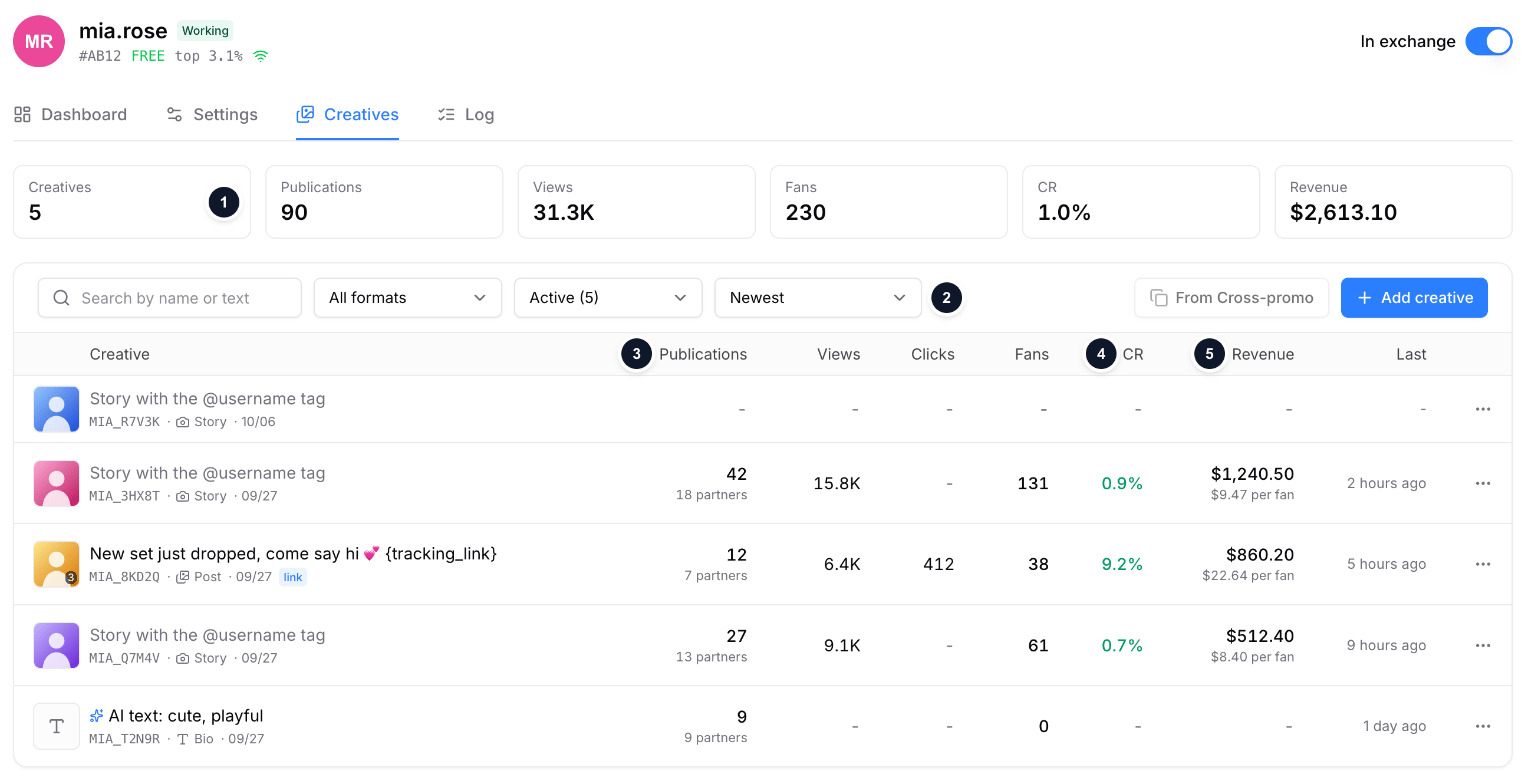
Sample data: the Creatives tab of a slot
- Totals: creatives, publications, views, fans, CR and revenue across the model’s creatives.
- Filters: search by name or text, active or archived, sort by date, fans, CR, views or revenue.
- Publications and how many partners published the creative.
- CR: fans per 100 story views (stories are counted 26 hours after publication) and per 100 clicks on post links.
- Revenue: what the fans the creative brought spent, with paying fans and revenue per fan.
The Creatives page
Studio → Shoutouts → Creatives shows the exchange creatives of all your accounts in one table: search, filters by account, format and status (active, disabled, archived), sorting by date, publications, views, fans, CR or revenue, and the same row menu as the slot tab. Add creative first asks which account the creative is for.Moderation
OnlyTraffic reviews exchange creatives. A creative that breaks the rules is disabled, for one of these reasons:- Explicit content: exposed nipples or genitals and sex acts are not allowed, since creatives go out on other clients’ pages.
- Shows another person: the creative must show your model.
- Another reason, written by the moderator.