

The My Slots page
- How the exchange works: five steps as your account’s progress: add a model, set up the slot, give first, receive, first revenue. The block can be hidden.
- Exchange results: 30 days of fans your models received (columns), views received from partners and page visits (lines). The header sums them up with the revenue of the fans received.
- Exchange pool: how many accounts are in the exchange, their fans in total, and what the pool exchanged in the last 7 days and in all time: views, days in bio and in friends, fans and what they spent. Pool numbers are rounded down, so 600+ means at least 600. The Your accounts tab shows the same for your models: what they received in 7 days and in all time. The (i) next to a period splits the views into stories and posts and the days into bio and friends. The page remembers the tab you picked.
- Your models in the exchange: status, what the model gives, given / received per format (stories and posts in views, bio and friends in days; formats with no exchange yet are left out), the fans received, revenue with the revenue per fan, and page visits for 7 days. A green +N next to a number is today’s increase. Every column sorts; a click on a row opens the slot.
Slot statuses
A working slot can still have warnings: “N warnings” under the status lists them, and the slot page shows each one with a fix.
Add a model
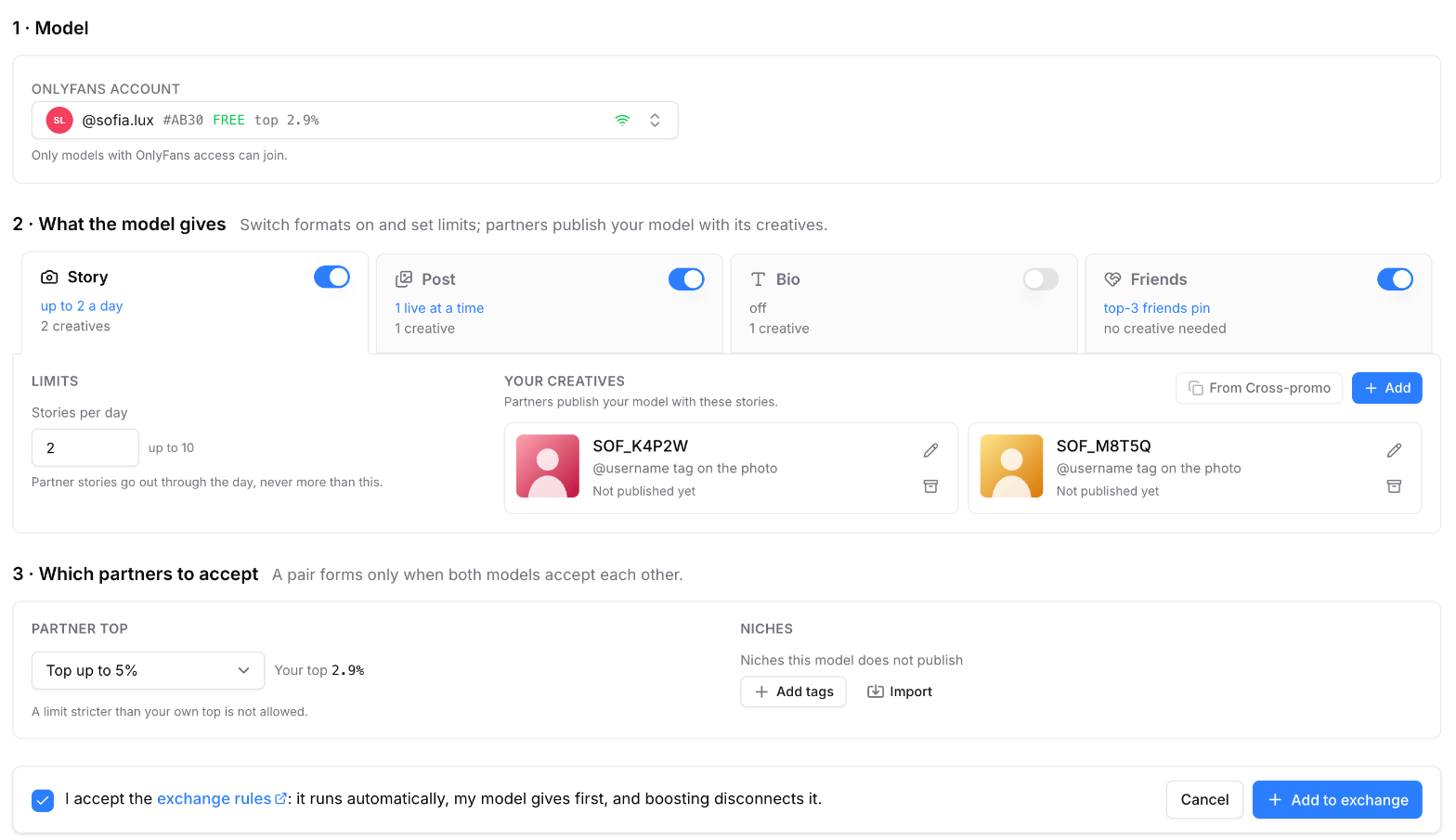
Sample data: adding a model
1
Pick the model
Click Add model in My Slots. Only models with OnlyFans access can join.
2
Choose what the model gives
Switch formats on and set the limits:
- Story: up to 10 a day. They go out spread through the day, at least an hour after any other story of the model.
- Post: up to 10 live at a time. Pin posts keeps partner posts at the top of the feed.
- Bio: a partner’s line at the top of the bio.
- Friends: partners pinned at the top of the friends list.
3
Choose which partners to accept
Partner top: the lowest top you accept, in whole numbers, for example “Top up to 7%”. It is at least your own top + 1, rounded up. Niches: tags of models your model does not publish. Import takes a comma-separated list of tags, and Copy puts the current list on the clipboard for another slot.
4
Accept the rules
Tick the exchange rules and click Add to exchange. The model starts by giving first.
The slot page
The header has the model and the In exchange switch. The page has five tabs: Dashboard, Fans, Settings, Creatives and Log.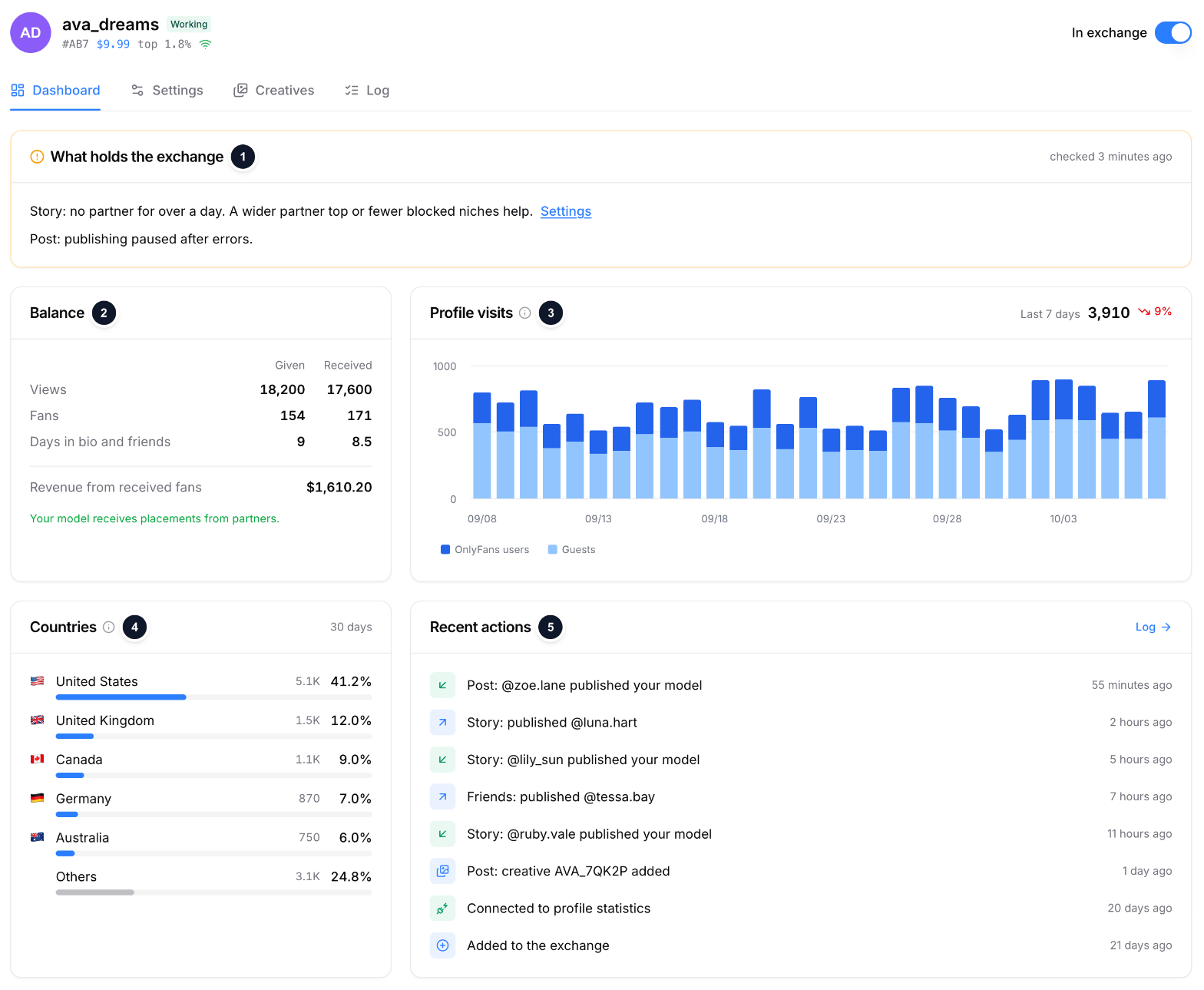
Sample data: the Dashboard tab
- What holds the exchange: the engine’s last check, with a fix next to each warning.
- Balance: story views, post views, days in bio and days in friends, given and received, with today’s +N. Under them the fans received and their revenue. The fans a partner got from your model are not shown. While the model gives first, a progress bar shows how much is left.
- Page visits: visits of OnlyFans users to the model’s page per day, guests left out; the last 7 days against the previous 7.
- Countries: where profile views came from in the last 30 days.
- Recent actions: added, connected, creatives, exchanges. Log opens the full list.
- Fans: the fans the model received through the exchange, see below.
- Settings: the same form as when adding. When the partner top in force differs from the one you set (it moved with your model’s top or came up to your top + 1), the form shows both.
- Creatives: the model’s exchange creatives with what partners delivered. More: Creatives.
- Log: every exchange of the model, the same list as on Placements with its own period.
Fans
The Fans tab shows who came to your model through the exchange, from which partner, and what they spent.- Cards: fans (and how many came by story view), spend, ARPU, fans with 3 or more messages, buyers.
- Chart: new fans a day as columns and their spend as a line, for 30 days or all time.
- List: the fan, the subscription date, the source (the partner that published your model, its top, the format and your creative) and the spend. A click on a row opens the subscription and every payment; refunds are marked.
- Filters: partner and source (story or post); sort by spend or by date, 50 fans a page.