

- Slot: your model in the exchange with its settings: formats, limits, partner top and niches.
- Partner: a model of another Studio client that your model exchanges with.
- Given and received: what your model published for partners and what partners published for it.
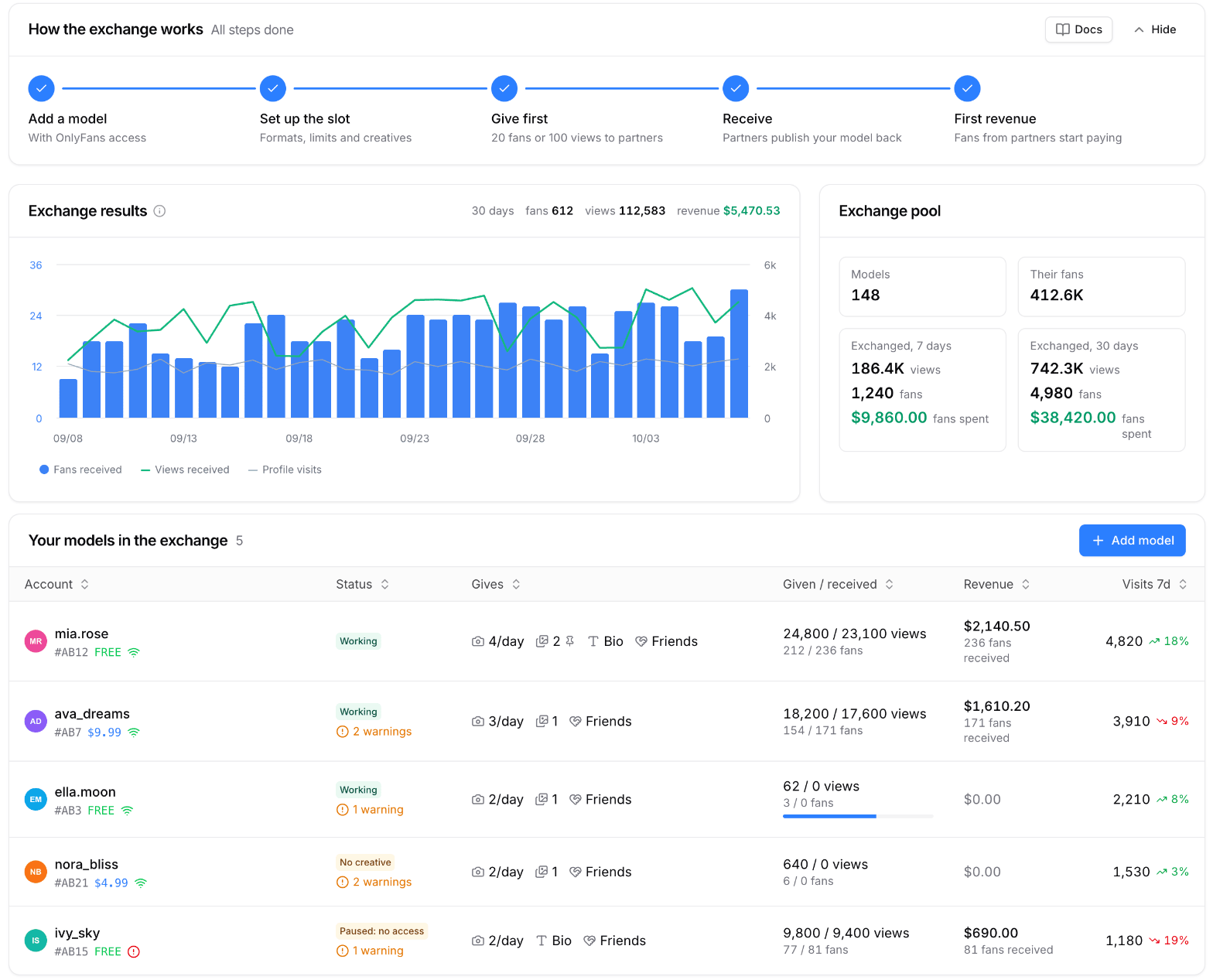
Sample data: My Slots
Formats
Partners publish your model with its exchange creatives: stories, posts and bio lines. Friends need no creative. More: Creatives.
What you need to start
- A model added to Studio with OnlyFans access. Without an active session the slot pauses until access is back.
- Exchange creatives for the formats partners publish: story, post and bio. They can be copied from Cross-promo.
- Models of one client never exchange with each other. To promote your own models on each other’s pages, use Cross-promo.
How it works
1
Add a model
In My Slots pick a model with access, switch on the formats it gives and set the limits. More: My Slots.
2
Set up the slot
Add creatives, set the partner top and the niches your model does not publish.
3
Give first
A new model publishes partners first: 100 views (stories and posts together) or 1 day in bio or friends. Until then it receives at most one placement.
4
Receive
Partners publish your model back. The engine keeps given and received close in each format.
5
Watch the results
Views, the fans your model received and their revenue show up in My Slots, on the slot page and on the Placements page. Who each fan is and what they spent: the Fans tab of the slot.
Balance
The exchange is settled in views and days, each format in its own coin:- Story views pay for stories.
- Post views pay for posts.
- Days in bio pay for bio.
- Days in friends pay for friends.
- In each format, models that gave more than they received in its coin are published first. With an equal balance the better OnlyFans top goes first.
- A model that is owed never publishes a model that owes in the same coin.
- Views count as measured. A story or post your model gives counts as its views come in (hourly). One it receives counts at once at the partner’s usual views (the median of its last 10) while it is up, and at its real views once it ends.
- A post can come down after 24 hours instead of 3 days when its partner goes over the post views debt limit or your model over the post views surplus limit.
Partner choice
- Similar top. In the slot you set the lowest partner top you accept, in whole numbers, for example “Top up to 7%”. It is at least your own top + 1, rounded up: with a top of 2.3% the strictest limit is 4%. The default is your top plus 1 point (below 1%), 2 points (1 to 5%) or 3 points (above 5%), rounded up to a whole number. A model without a top accepts partners of any top.
- The limit follows your top. When your model’s top gets worse, the limit moves by the same distance. When the top recovers, the limit comes back to the value you set.
- Niches. Models from the niches you exclude are not published on your model.
- Both sides agree. A pair forms only when both models accept each other.
- No repeats for 3 days. Your model publishes the same partner at most once in 3 days. The other direction is not limited: the partner can publish your model right away.
- No catalog. Models in the pool are not listed anywhere, so nobody can target one of them. My Slots shows the pool totals only.
What the engine skips
- Bio, when the first 3 lines of your bio already carry an @username or an OnlyFans link. The bio is checked on OnlyFans itself every 6 hours, so links you add outside Studio count too.
- Friends, when your model already has its own pinned friends.
- A post without a tracking link. When the partner’s link cannot be created, the post does not go out and the engine moves on to another partner.
- Partners that do not fit: inside the 3-day pause, over a balance limit, outside your top or niches. When no partner fits a format for over a day, the slot shows a warning.
Your bio stays as it is: the partner’s line is added on top and removed after 3 days. Friends you pinned yourself are never touched.
Boosting and bots
Targeted boosting of views, visits or fans, bots included, disconnects the model from Shoutouts. Its posts, bio lines and friends pins come down and the slot shows the reason.Sections
My Slots
Adding a model, formats and limits, partner top, the slot page
Creatives
Stories, posts and bio lines partners publish, copying from Cross-promo
Placements
Every exchange, warnings and how each number is counted
Swaps (legacy)
The earlier fan exchange through offers
FAQ
Is the exchange paid?
Is the exchange paid?
No. Shoutouts is free: your model pays with placements for partners.
Why does my model only give so far?
Why does my model only give so far?
A new model gives first: 100 views (stories and posts together) or 1 day in bio or friends. After that partners publish it. The balance column in My Slots shows the progress.
Why don't I see how many fans my model gave?
Why don't I see how many fans my model gave?
Those fans belong to the partner, just as the fans partners bring you are yours. The exchange is settled in views and days, so the views your model gave are shown and its given fans are not.
Why is nobody publishing my model?
Why is nobody publishing my model?
Open the slot warnings. The usual reasons: no creative for a format, the model received more than it gave, or no partner fits the top and niches. A wider partner top or fewer excluded niches help.
Can two of my models exchange with each other?
Can two of my models exchange with each other?
No. Models of one client never pair in Shoutouts. Promote your own models on each other’s pages with Cross-promo.
Why does a story show no fans yet?
Why does a story show no fans yet?
Fans by view are counted about 26 hours after the story goes out. Until then the log says “fans: counting”.
What happens when I switch the slot off?
What happens when I switch the slot off?
The model stops giving and receiving. The posts, bio line and friends pins it carries for partners come down; stories stay until their 24 hours end. What partners already published for your model stays until its time is up.